Loyalty points
Loyalty points reward customers who come back. Every sale with a customer earns points on what they pay, and on a later visit they spend the points as money off. Points move with every sale and return, so a returned item takes its points back.
Loyalty points need the loyalty points feature in your plan (the LP feature of the POS add-on; see Your subscription and billing). The Sales › Loyalty points page needs loyalty_manage. Without the feature the page says "Your plan does not include loyalty points" and the till shows no points.
Set up the program
- Switch on points for each branch that should use them: in Inventory Management › Warehouse Management › Warehouses, turn on Loyalty program for the warehouse (see Stores and warehouses). Your plan sets how many warehouses can use it.
- Open Sales › Loyalty points.
- Switch on Use loyalty points. The page shows which warehouses use points ("Used in: …").
- Fill in the rules below and choose Save. The tills use the new rules from then on.
| Field | What it does |
|---|---|
| Points per 1 (your currency) | How many points each 1.00 paid earns. 0.5 gives a point for every 2 spent |
| One point is worth | The money off one point gives when spent |
| Fewest points spent at a time | The minimum a customer can spend in one sale |
| Most of an invoice paid with points (%) | A cap on how much of one invoice points can pay |
Under the fields a sentence shows the result, for example "A customer paying 100.00 earns 100 points, worth 5.00 on a later visit (5.0% back)."
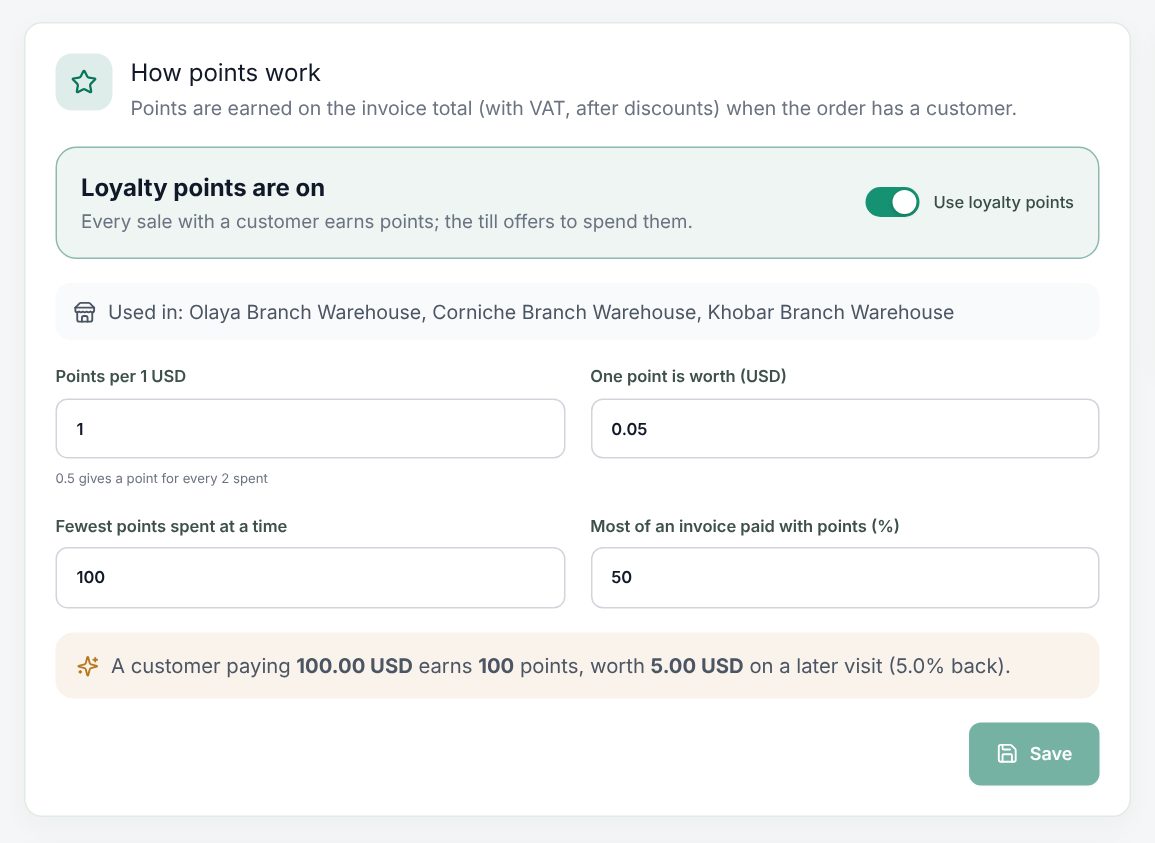 Sales › Loyalty points with the rules and the live example
Switching the program off stops earning and spending, but balances are kept.
The top of the page shows Customers with points, Points held (and what they are worth), Earned, last 30 days and Spent, last 30 days. Most points lists the customers holding the most.
Boosts
A boost earns more on some days, like double points on Fridays. Choose Add boost:
| Field | What it does |
|---|---|
| Name, Arabic name | For example "Double points Friday" |
| Times the points | 2 doubles the points |
| From, Until | Empty From: from now. Empty Until: no end |
| Every day | Off: tap the days it runs (Sat to Fri) |
| On | Switch the boost off without deleting it |
Choose Save boost. When several boosts run on the same day, the highest counts. Deleting a boost keeps the points already earned.
Earn and spend at the till
Earning is automatic: add the customer to the order (Add customer, or F4) and the sale earns points when it is paid. The customer button shows their balance with a star.
To spend points:
- Add the customer and the items.
- Tap Use points in the cart. The Loyalty points dialog shows their Balance and what is Usable on this order.
- Type the Points to spend, or tap a quick amount or All usable.
- Choose Use points. The cart shows the points and the money off. Tap the × (Remove points) to take them off.
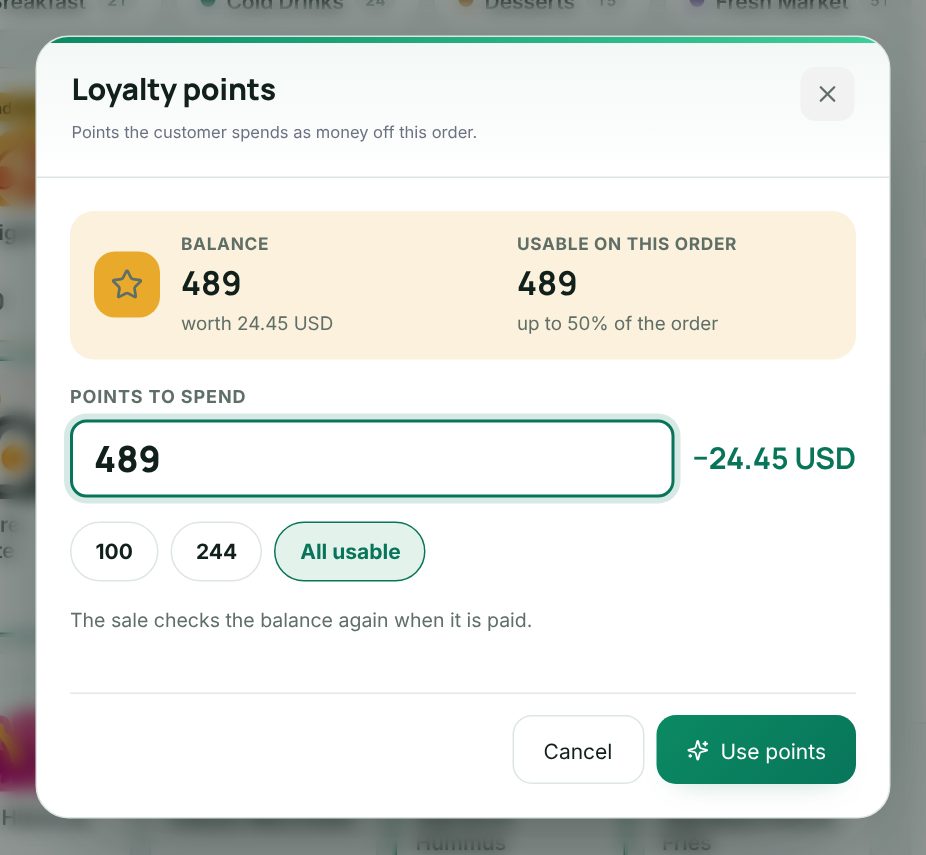 The Loyalty points dialog in the till with the balance and points to spend
adding a customer and spending their points on an order
The receipt prints the points used, Points earned and the new Points balance.
A customer's points
On the customer's page (Customers, edit) the Loyalty points card shows the balance and history: Earned, Spent, Return and Adjusted. To add or take points by hand, type +100 or -50, give a reason ("Why"), and choose Change points (needs loyalty_manage). See Customers and customer groups.
How points are worked out
- Points are earned on the invoice total, with VAT, after every discount, including the points spent. They are whole points, rounded down.
- A boost multiplies the points earned on that business day.
- Spending gives money off the invoice: points × point value. It never goes over the shop's cap and never applies to tobacco items.
- A return takes back the points the returned goods earned and gives back the points spent on them, in proportion. The credit note prints Points taken back.
Good to know:
- Points work only online: the server checks the balance while the sale is saved, so two tills cannot spend the same points. Offline, the till does not offer them.
- A quotation does not keep points; they are taken off when you switch the order to Quotation.
Example
A café sets Points per 1 to 1, One point is worth 0.05, Fewest points spent at a time 100, and Most of an invoice paid with points (%) 50. A boost "Double points Friday" has Times the points 2 on Fridays.
Lina pays 40.00 on Monday and earns 40 points. On Friday she pays 30.00 and earns 60. She now has 100 points, worth 5.00. On her next 8.00 order she can use at most 4.00 (50%), which is 80 points, but she must spend at least 100 at a time, so she keeps them for a bigger order.
Last updated 17 Oct 2026