Order center and pickup screen
The order center shows every open order of a branch and where it is: new, being prepared, ready, or handed over. It updates live, so the front of house, the pass and the manager all see the same board. The pickup screen is its customer-facing side: a TV that shows takeaway and delivery order numbers as they are prepared and ready to collect.
Both need the KDS add-on. They work with or without kitchen screens. With Kitchen display screens, orders move on by themselves as the cooks bump dishes.
| Permission | Lets staff |
|---|---|
| Order status read | Open Restaurant Management › Order center |
| Order status update | Move orders between columns |
| Customer order status read | Open Restaurant Management › Pickup screen (order status read also works) |
The board
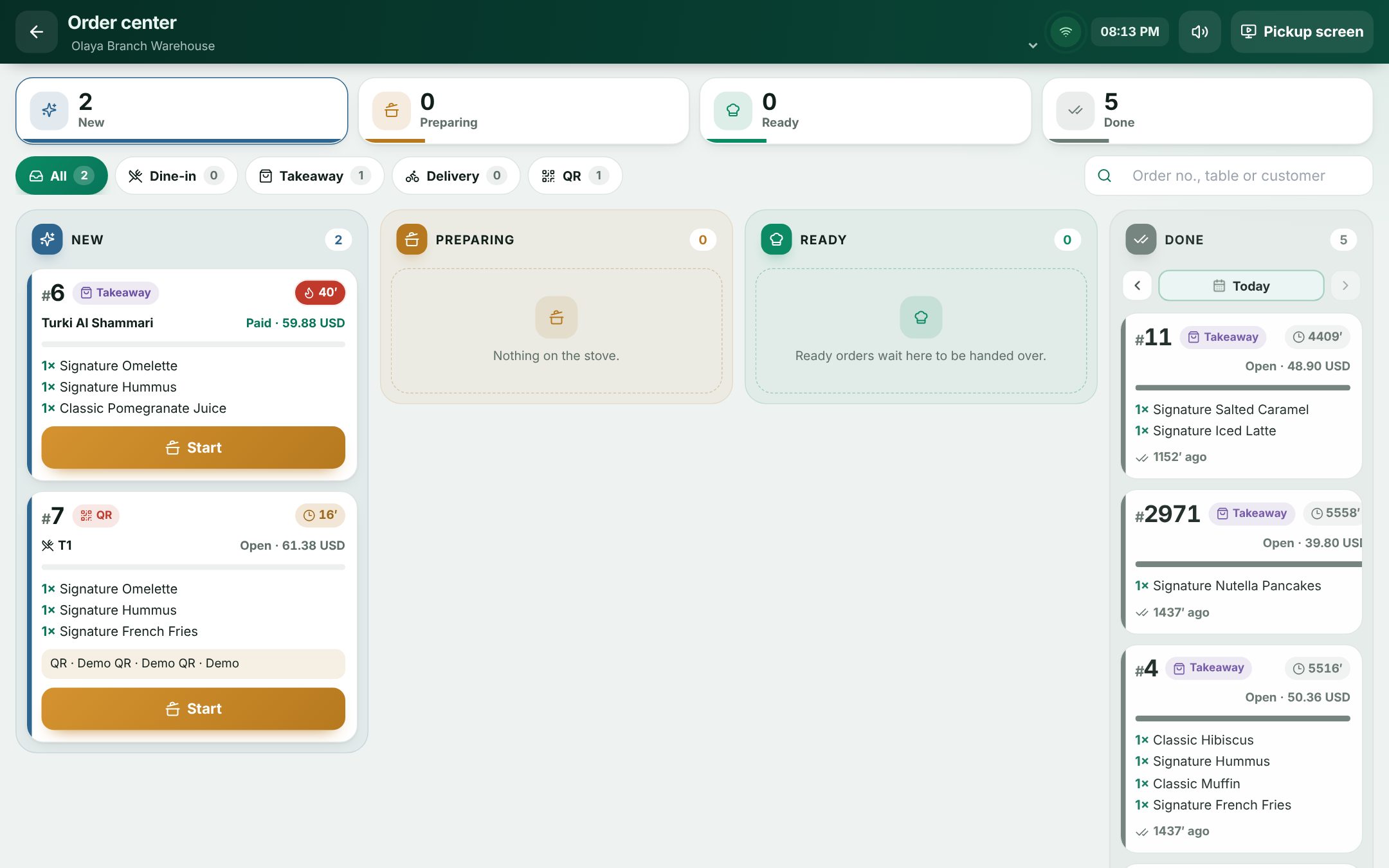 The order center board with its four columns
Open Restaurant Management › Order center. If you work in several branches, pick one at the top. The board has four columns. On a phone, they become tabs.
| Column | Meaning |
|---|---|
| New | Nothing started yet |
| Preparing | The kitchen started at least one dish |
| Ready | Every dish is ready: a takeaway waits to be collected, a dine-in dish waits to be served |
| Done | Handed over or served |
The board holds open checks on tables, held takeaway and delivery orders, and paid takeaway and delivery orders of the last 12 hours that were not handed over yet.
Each card shows the order number, the channel, the table and number of guests or the customer, how long it has waited, whether it is Paid or Open with its total, the dishes ready out of all dishes, and the first dishes.
Use the chips All, Dine-in, Takeaway, Delivery and QR to filter, or search by Order no., table or customer. A chime rings for new orders. Use the speaker button to mute it. When guests' QR orders wait for a waiter, a bar names their tables with an Open the till button.
Move an order on
The main button on a card moves the order to its next step:
| Card in | Button | Moves to |
|---|---|---|
| New | Start | Preparing |
| Preparing | Ready | Ready |
| Ready | Served (dine-in) or Hand over (takeaway, delivery) | Done |
The kitchen screens follow. Ready marks every dish ready, and Done marks every dish handed over or served. A message confirms each move with an Undo button. To step an order back, use the Move back arrow on the card.
Recall a finished order
Done is final, with one exception: within 10 minutes of an order being handed over or served, you can bring it back with Recall. After 10 minutes, the Recall button disappears from the card. If you try anyway, you see "This order was handed over more than 10 minutes ago; it can no longer be moved back."
The Done column shows one day at a time. Use the arrows or the calendar to see an earlier day, Today to come back, and the page arrows to see more orders.
The pickup screen
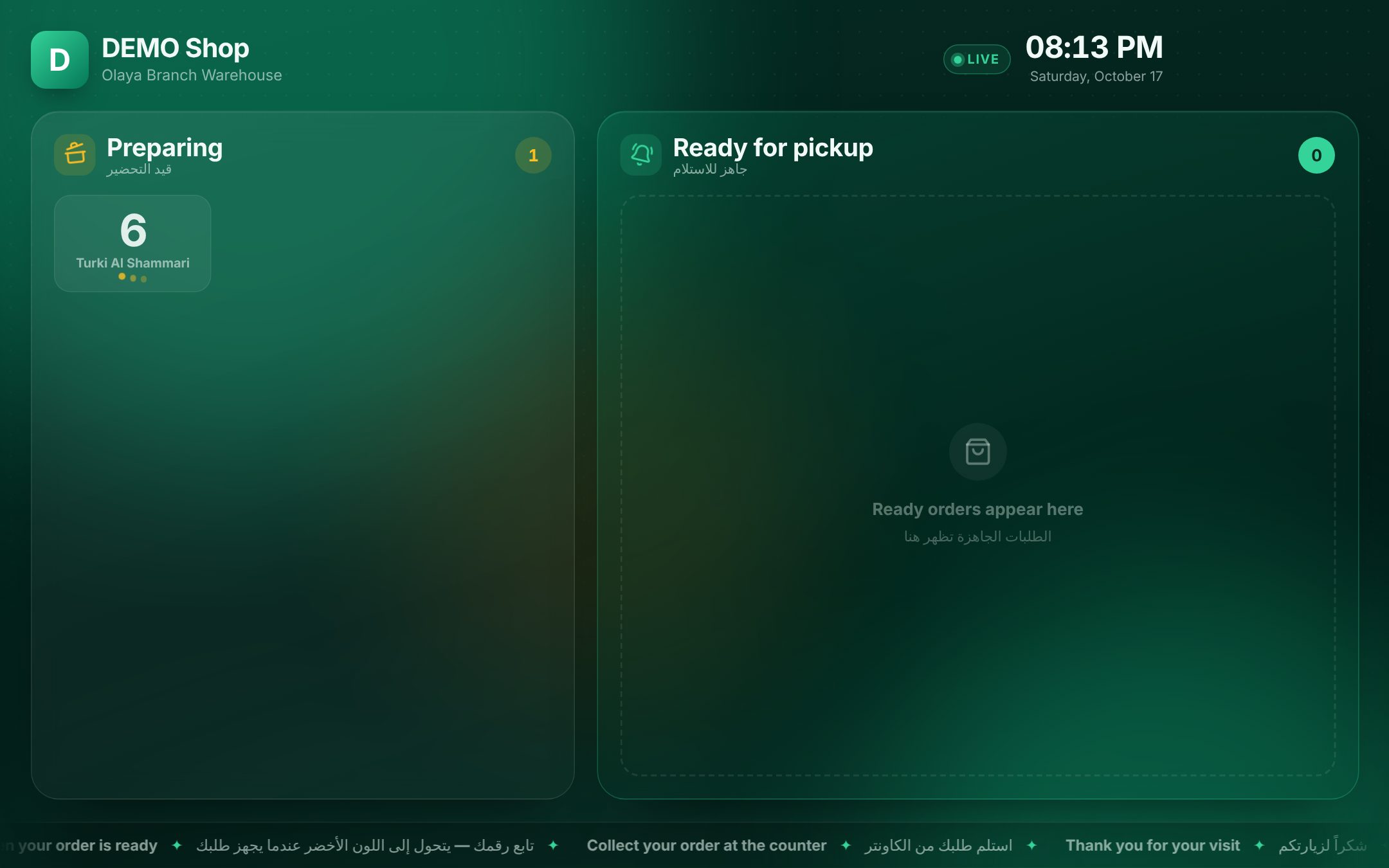 The customer pickup screen on a TV
Choose Pickup screen in the order center, or open Restaurant Management › Pickup screen on the computer that drives the TV. Use the full-screen button.
- Preparing lists the numbers that are not ready yet (including new ones), and Ready for pickup lists those to collect, with the newest one large.
- When an order becomes ready, its number is called out over the whole screen with a chime: "Order ready. Please collect it at the counter."
- Only takeaway and delivery orders show. Dine-in orders are served at the table.
- Texts show in English and Arabic side by side. A running line at the bottom tells customers to watch for their number.
Good to know
- Every change is live. The board reloads by itself when an order moves on a till, a waiter handheld or a kitchen screen.
- With kitchen screens, the column follows the dishes. If staff move an order further, the board shows the further step.
- Waiters see their own orders on the Waiter handheld under My orders.
Examples
A burger counter. Order #42, a takeaway, comes in under New. The cook taps Start, then Ready when the bag is packed. Number 42 lights up on the pickup screen. When the customer collects it, the cashier taps Hand over.
A mistaken tap. A waiter marks table 5 Served, but the dessert has not gone out. Three minutes later, the manager taps Recall on the card in Done, and the order goes back to Ready. After 10 minutes this would no longer be possible.
Last updated 17 Oct 2026