Salespeople and commission
Commission pays your sales staff a share of what they sell. You mark who sells and their rate, the cashier picks the salesperson on each order, and the Commission report adds it up and lets you pay it out. Each sale keeps what it earned at the moment it was made: changing a rate or plan later never changes past sales.
Both pages need the POS add-on. Sales › Salespeople needs employee_read (changes need employee_update); Sales › Commission needs report_commission.
Set up salespeople
Open Sales › Salespeople. Every employee has a card:
- Switch the pill from Off to Sells for each person who sells.
- Type their Commission percent (0 to 100). It saves by itself.
- If you use plans, pick one in the plan list, or keep No plan (own rate).
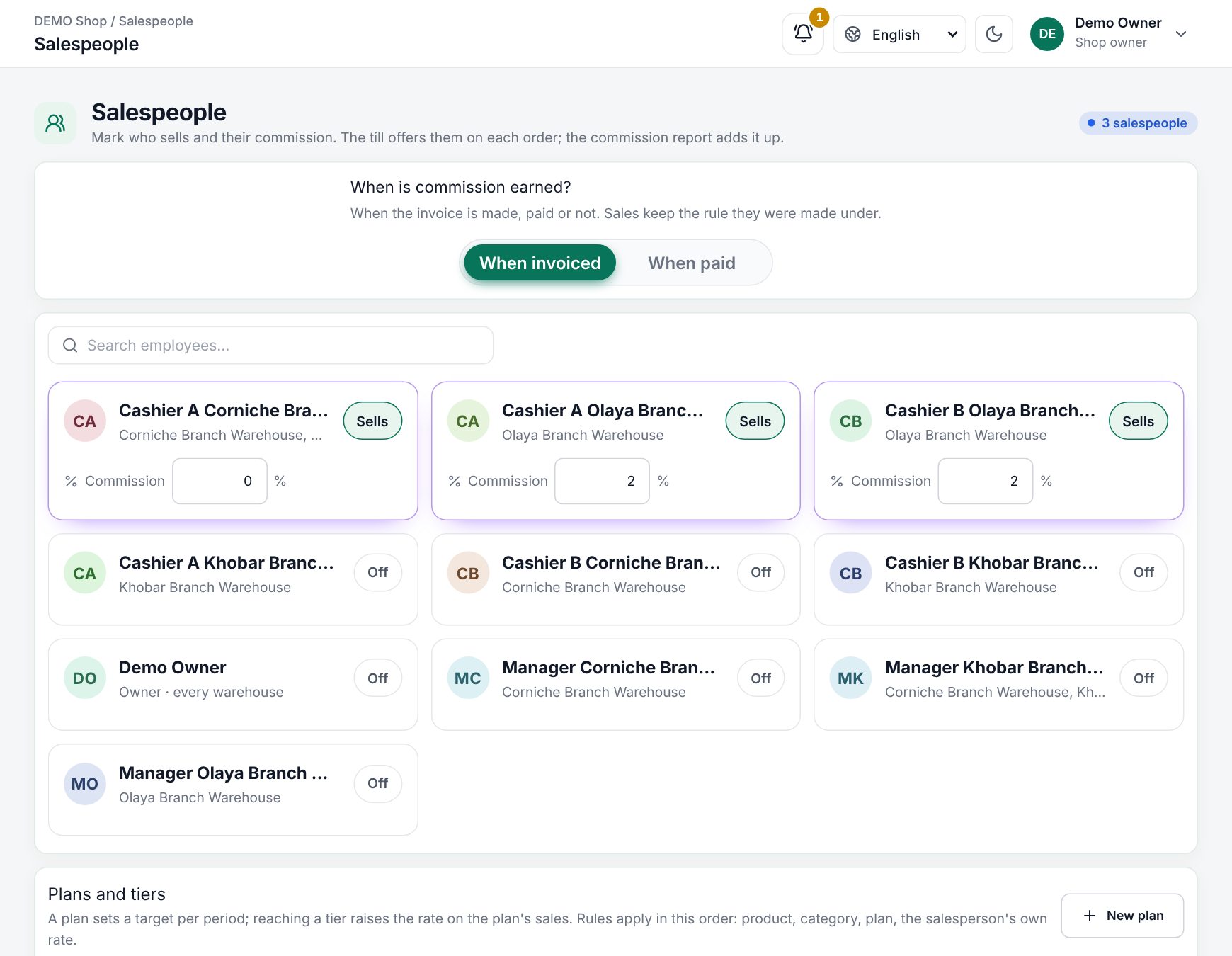 Sales › Salespeople with the Sells switch and the commission rate per employee
When is commission earned?
| Choice | Meaning |
|---|---|
| When invoiced | The sale earns as soon as the invoice is made, paid or not |
| When paid | A credit sale earns its share with each payment the customer makes |
Sales keep the rule they were made under. Changing this setting needs setting_create.
Plans and tiers
A plan pays a higher rate when a salesperson reaches more of their target. Choose New plan and set:
| Field | What it does |
|---|---|
| Name | For example "Floor staff 2026" |
| Period | Monthly, Quarterly or Yearly |
| Basis | On sales (value without VAT, after discounts) or On profit (that value less cost, never below 0) |
| Tiers | Reached rate on everything pays the reached tier's rate on the whole period; Each band its rate pays each band at its own rate |
| Tier rows | From a % of target, pays a rate %. Add tier for more |
| Active | Only active plans can be picked |
The first tier (from 0%) is the rate each sale records. The period's tier is settled in the report and in payouts.
Targets sets each person's target for the period of their plan; a bar shows how far they are.
Product and category rules
- Product commission: search a product and give it a percent of its value, or a Fixed per unit amount. A product's own rule replaces every other.
- Category commission: a percent or a fixed amount per unit for a category and its sub-categories. Leave both empty to use the salesperson's rate.
For each line the first rule that applies wins: product, then category, then the plan's first tier, then the salesperson's own rate.
Pick the salesperson at the till
When the branch has salespeople, the order shows a Salesperson button.
- Tap Salesperson. The dialog says "Who sold this order: the commission goes to them."
- Choose One person and tap a name, or choose Split, tap two or more people and set each Share %. Even split shares it equally; the dialog shows Adds up to 100% when the shares are right. Then Use split.
- To give a single line to someone else, tap the small avatar on that line (Line salesperson). That person earns the whole line. Use the order's salesperson undoes it.
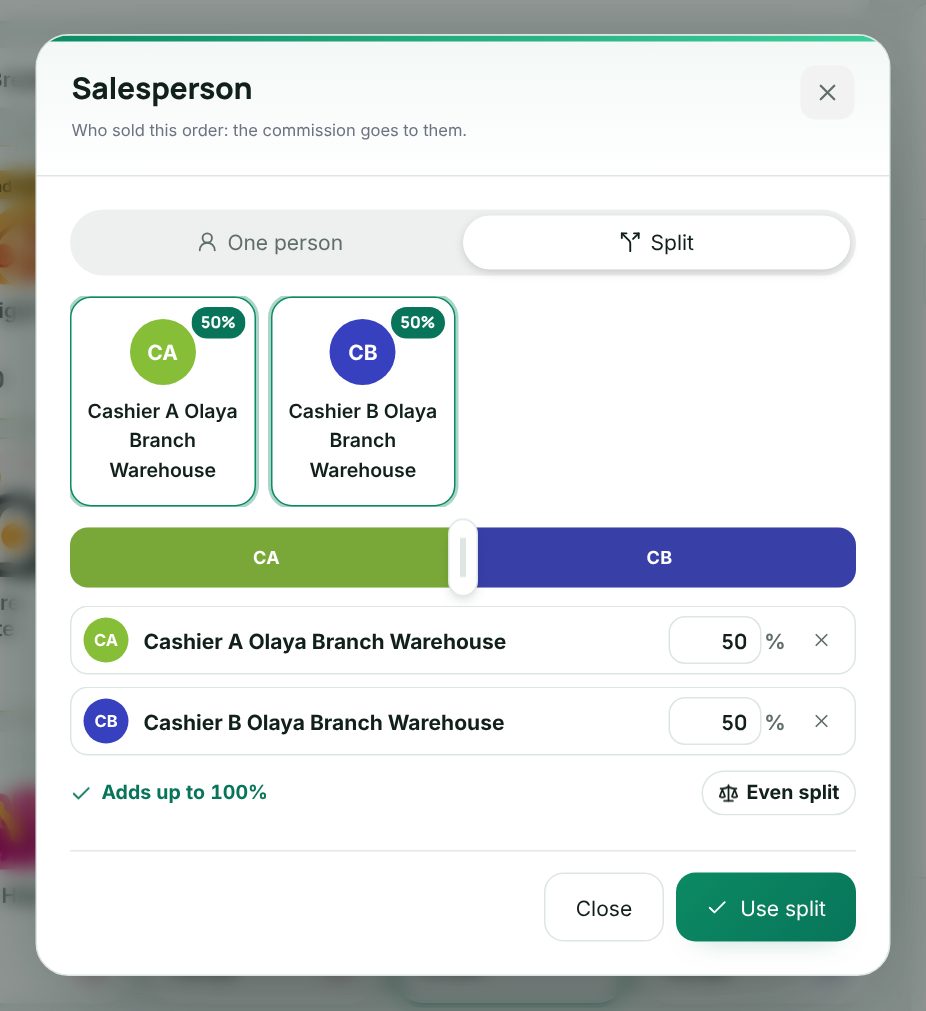 The Salesperson dialog in the till with Split selected and shares
choosing a split between two salespeople on an order
A salesperson sees My commission in the till's header: today's figure, and on a tap the period's Net commission, Earned, Waiting for payment, Taken back by returns and progress toward their target. Only their own figures show.
Tip: A quotation keeps its salesperson. When it is sold, the sale goes to the same person (see Quotations).
The commission report
Open Sales › Commission and pick This month, Last month, Last 7 days or dates. Overview shows Commission due, Net commission, Earned, Waiting for payment and Sales with a salesperson, then one row per salesperson. The switch above the rows (Salespeople, Category, Product, Warehouse) groups them another way. Excel and PDF export the view.
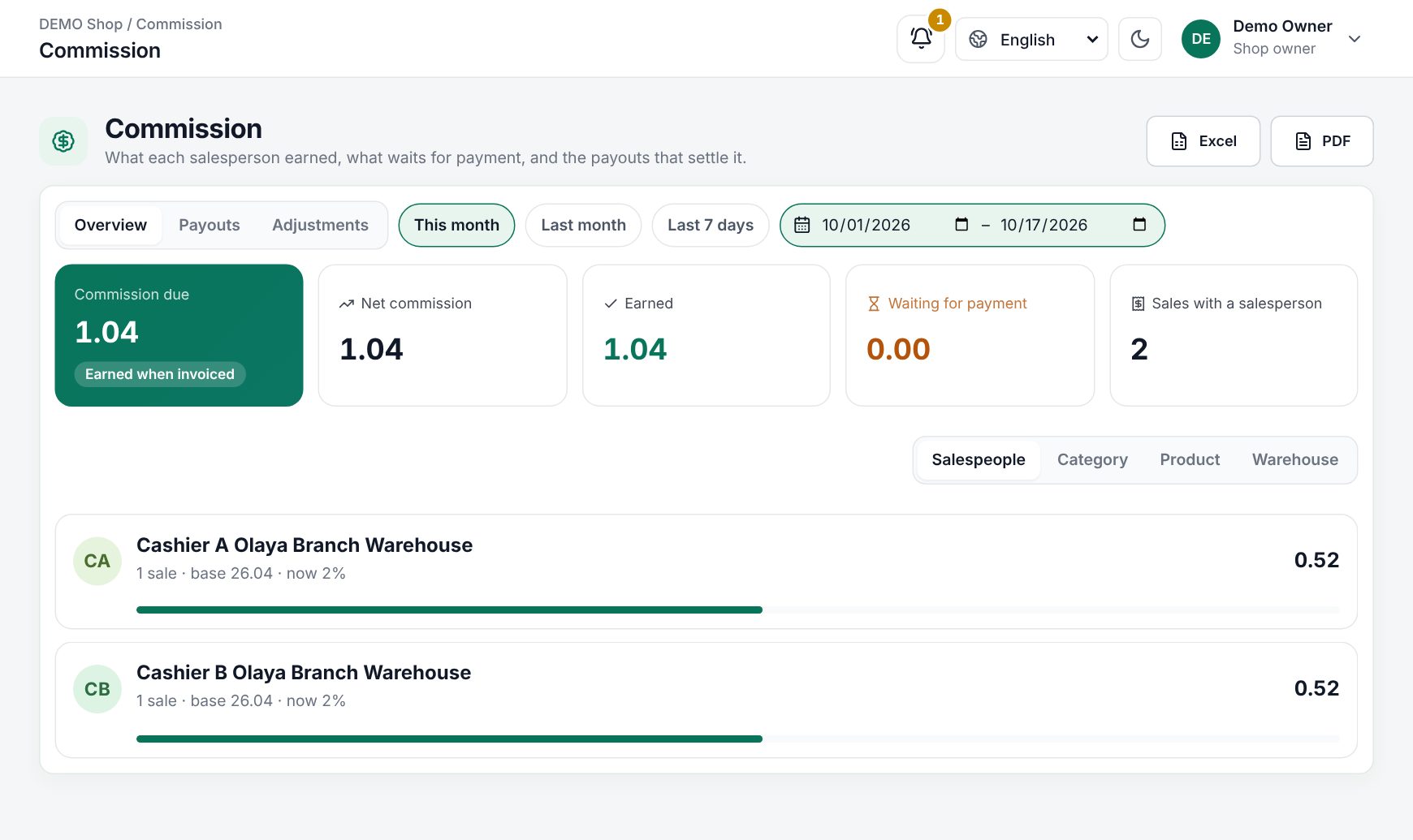 Sales › Commission overview with one row per salesperson
Click a salesperson to see their sales, the rule behind each line, their target and Tier bonus.
Returns take back the commission on the goods returned; a fixed rule gives back its amount per unit.
Adjustments and payouts
Adjustments adds a plus or minus amount with a date and Reason, for example a bonus or a correction. It needs commission_adjust.
Payouts (needs commission_payout):
- Choose New payout, pick the Salesperson and the dates. It gathers everything earned up to the end date that no payout holds yet: sales less their returns, tier bonuses and adjustments.
- Choose Create payout. It starts as Draft.
- Approve it, then Mark paid with Cash, Bank transfer, Cheque, Payroll or Other. For cash, tick Paid from my open till drawer (records a pay out) to take it from your drawer.
- Slip prints a payout slip.
A cancelled payout frees its items for a new one. Nothing is paid twice.
Example
Sara and Omar sell phones. Sara's rate is 2%; Omar is on a monthly plan: 2% from 0% of target, 3% from 100%, Reached rate on everything, target 50,000. A 4,000 phone sold by both on a 50/50 split earns each half of the line at their rate. At month end Omar reached 52,000, so the report shows a Tier bonus of the extra 1%. Accessories have a Fixed per unit rule of 5.00, so a case earns 5.00 whoever sells it.
Last updated 17 Oct 2026