Tobacco fee
Shops that sell tobacco (for example shisha in a café) add an excise fee on top of the item price. Infotech POS works out this fee automatically at the till, per unit, from price tiers you set in Settings › Tobacco fee. The default tiers follow the Saudi rule. When the law changes, you change the tiers; no update is needed, and open tills use the new rule at once.
Turn on tobacco selling
- Open Settings › Tobacco fee.
- Under Tobacco sales, turn on This shop sells tobacco items. The card then reads Tobacco fee enabled: "The configured fee is added to every tobacco item sold."
- Check the Fee tiers (below) and choose Save changes (or Save in the bar at the bottom). Reset drops unsaved changes.
With the switch off, the card reads Tobacco fee disabled: "Menu items cannot be marked as tobacco and no fee is charged."
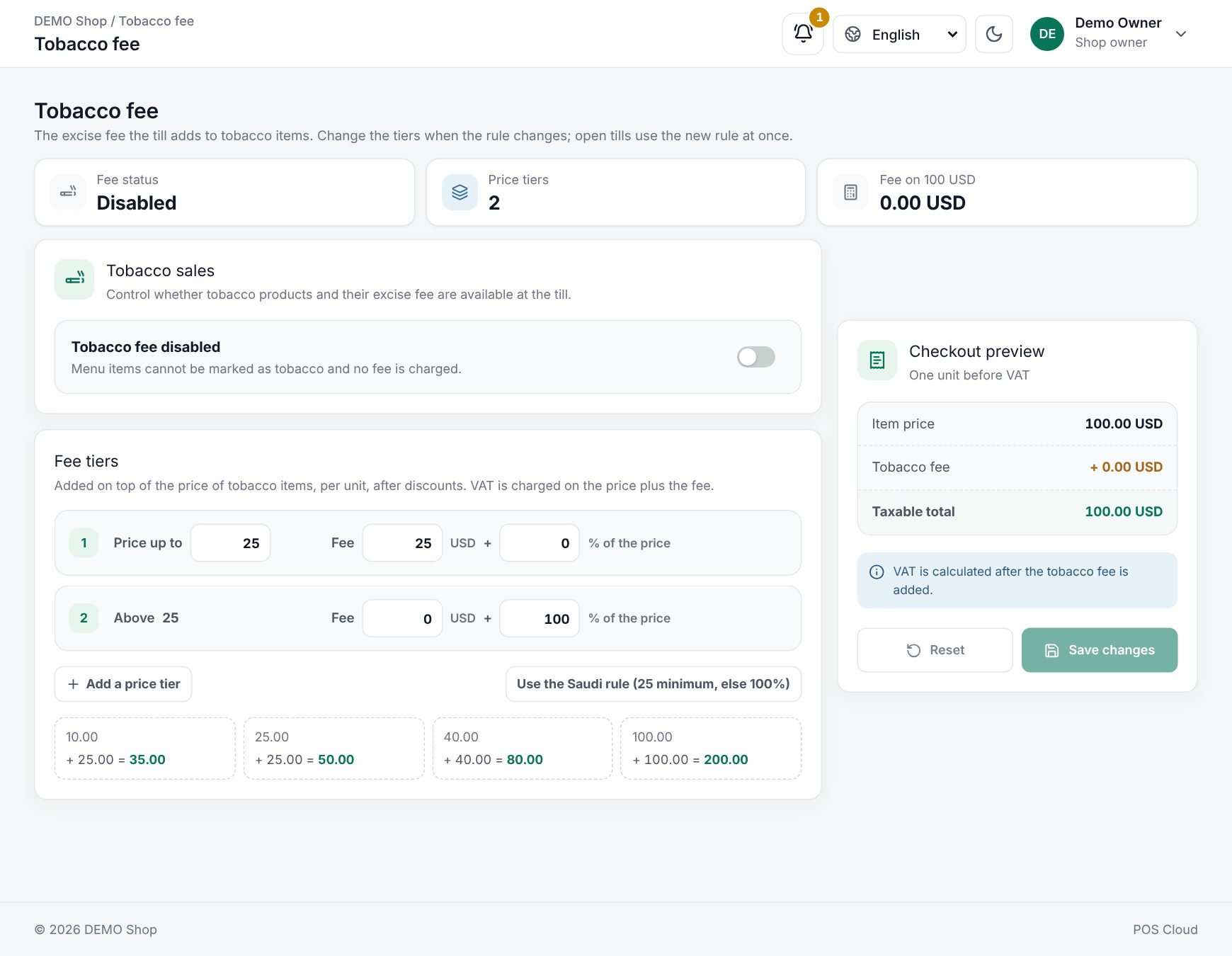 Settings › Tobacco fee with the switch, fee tiers and checkout preview
Mark a menu item as tobacco
In the menu item's form, under Where it appears, turn on Tobacco item ("Sold on its own: no additions or modifier groups"). The switch only shows when the shop sells tobacco. See Menu items and recipes. Tobacco items:
- have no modifiers or additions, and cannot go into a combo,
- never take part in promotions,
- cannot be paid with loyalty points, and are left out of service charges,
- cannot have their price changed at the till.
The fee tiers
Under Fee tiers ("Added on top of the price of tobacco items, per unit, after discounts. VAT is charged on the price plus the fee."), each tier says: for a price up to a limit, the fee is a fixed amount plus a percent of the price.
| Part | Meaning |
|---|---|
| Price up to | The upper limit of the tier. The last tier has no limit: it reads Above the previous limit, or Any price if it is the only tier |
| Fee … + … % of the price | The fixed amount and the percent of the price for that tier |
- Add a price tier adds a tier (up to 10).
- The bin icon removes a tier.
- Use the Saudi rule (25 minimum, else 100%) puts the default tiers back.
The default (Saudi) tiers:
| Price per unit (before VAT) | Fee |
|---|---|
| Up to 25 | 25 (fixed) |
| Above 25 | 100% of the price |
Examples under the tiers update as you type: 10.00 + 25.00 = 35.00, 25.00 + 25.00 = 50.00, 40.00 + 40.00 = 80.00, 100.00 + 100.00 = 200.00. The Checkout preview shows one unit: Item price, Tobacco fee and Taxable total ("VAT is calculated after the tobacco fee is added.").
What happens at the till
- The tile shows the price with the fee and VAT already added, with incl. tobacco fee under it. A shisha priced 40.00 before VAT shows 92.00.
- Tapping adds it straight to the order (a tobacco item with sizes opens the size choice, with fee-inclusive prices). No options dialog opens: tobacco has no modifiers.
- The order line shows Tobacco fee +40.00 under the name, and the line total includes fee and VAT.
- The totals show Subtotal, any Discount, a Tobacco fee row, then VAT.
- Discounts first: a line discount, coupon or customer group discount lowers the price before the fee is worked out, so it lowers the fee too, down to the tier's minimum.
- Receipt, invoice and sale details show the fee per line and in total, before Total excluding VAT.
The fee is worked out on the price after discounts and before VAT. If the menu price was entered with Price includes tax, the VAT is taken out of it first.
Worked example: shisha at a café
A shisha at 40.00 before VAT, 15% VAT, default tiers:
| Step | No discount | 10% line discount |
|---|---|---|
| Price | 40.00 | 36.00 |
| Tobacco fee (above 25: 100%) | 40.00 | 36.00 |
| Taxable amount | 80.00 | 72.00 |
| VAT 15% | 12.00 | 10.80 |
| Pay | 92.00 | 82.80 |
A cheaper shisha at 20.00 falls in the first tier: fee 25.00, taxable 45.00, VAT 6.75, pay 51.75. With a 10% discount it becomes 18.00 + 25.00 = 43.00, VAT 6.45, pay 49.45: the fee stays at its minimum.
When the rule changes
Suppose a new rule sets a minimum fee of 30 for prices up to 30, and 120% above. Change the first tier to Price up to 30 with Fee 30 + 0%, the last tier to 0 + 120%, check the examples, and choose Save changes. Every open till reloads its catalogue and prices tobacco with the new rule straight away. Past sales keep the fee they were charged.
Related: Taxes, Using the POS till.
Last updated 17 Oct 2026