Business days
A business day is one trading day of one branch. Every sale, return and drawer movement belongs to a business day. At the end of the day, once every cash drawer is closed, a manager closes the business day. Its totals are then frozen, and anything sold after the close counts for the next day.
Closing the day gives you an end-of-day figure per branch that never changes afterwards, even if a late offline sale arrives or a till keeps selling past midnight.
What you need
- The POS add-on.
- The permission Close the business day (
business_day_close) to see the page in the menu and to close days. Give it to owners and shift managers, usually not to cashiers.
When a business day starts and ends
You do not open a business day; it starts by itself with the first sale or cash session of the day.
Which calendar day a sale belongs to follows Day Start in Settings › General settings › Sales and invoices. For a shop open until 2 a.m., set Day Start to 04:00: sales before 4 a.m. count for the day before.
Once a day is closed, it takes no more sales, returns, drawer movements or tips. They go to the next day that is still open. This also applies to offline sales made on that day but sent to the server after the close.
The business days list
Open Sales › Business days. Pick the Branch at the top. The tiles show the number of Business days, how many are Open (Waiting to close or All caught up) and Closed; once some days are closed, a tile with the Net total of closed days is added. Filter the list with Status: All, Open or Closed.
Each day shows its date and:
| Label | Meaning |
|---|---|
| Today · In progress | Today's day, still trading |
| Waiting to close | An earlier day nobody has closed yet |
| Closed by name | Closed, with its net total |
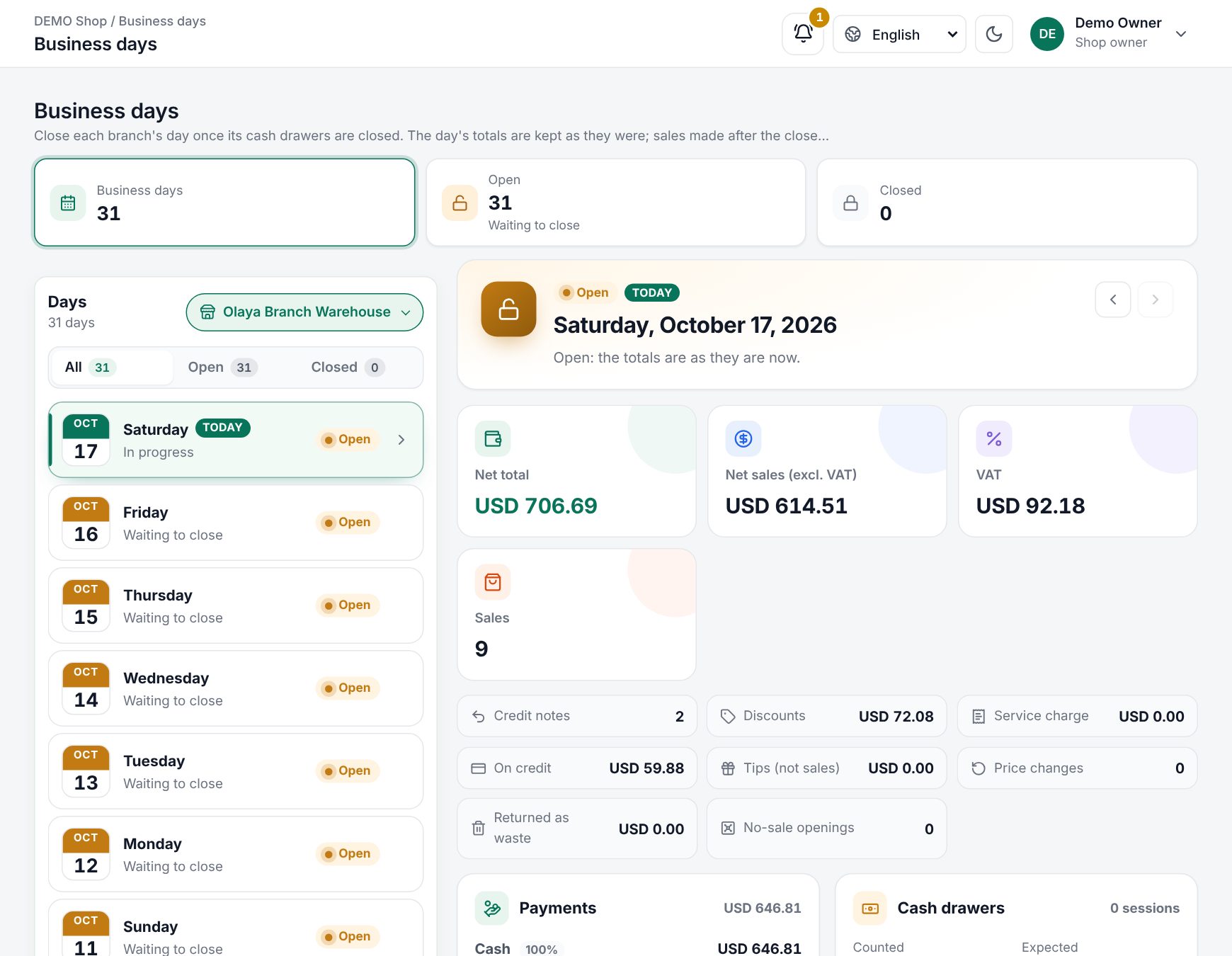 The business days list with a day selected and its totals
A day's details
Choose a day to see it on the right. Use the arrows (Earlier day, Later day) to step through days.
| Section | Shows |
|---|---|
| Top figures | Net total, Net sales (excl. VAT), VAT and the number of Sales |
| Other figures | Credit notes, Discounts, Service charge, On credit, Tips (not sales), Price changes, Returned as waste, No-sale openings |
| Payments | Each payment method: Taken, Refunded and the net |
| Cash drawers | Cash Counted against Expected, with Short, Over or Balanced |
| Cashier sessions | Each cash session of the day, its cashier, times and difference; still open or All closed |
For an open day the figures are as they are now. For a closed day they are kept as they were at the close, with who closed it and the note.
Close a business day
- Make sure every cashier has closed their cash session for that day (see Cash sessions and X/Z reports).
- Open Sales › Business days, pick the branch and the day.
- Read the Close the day card. It says Ready to close or Not ready yet, with checks:
- Every cash drawer of the day is closed. If not, it says how many are still open, for example "2 cash drawers are still open — close them first.", and Close the day stays greyed out.
- The day has started. A future day cannot be closed.
- Open checks (restaurant tables not yet paid) are only a warning: they stay open and count for the day they are paid.
- Optionally add a Note, for example "Counted by the shift manager".
- Choose Close the day, then confirm at Close this business day?.
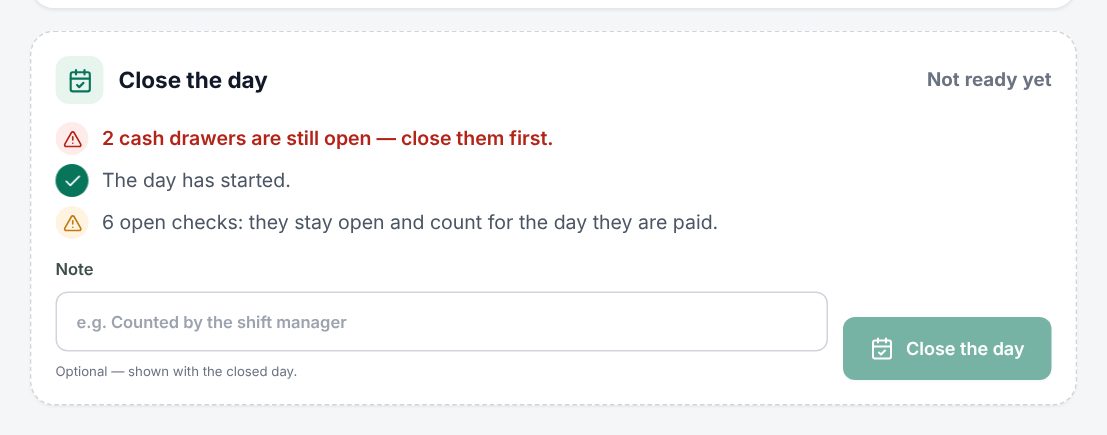 The Close the day card with its checks
Note: A closed day cannot be opened again. Check the cash drawer figures before you confirm.
Good to know:
- Each branch has its own business days. Closing the main branch does not close the others.
- You can close earlier days that were missed, one at a time.
- A day only appears in the list once it has sales, cash sessions, or was closed.
Examples
A restaurant open past midnight. Day Start is 05:00. On Friday the last bill is paid at 1:30 a.m.; it counts for Friday. At 2 a.m. the manager closes both cash sessions, opens Business days, sees Friday as Ready to close with two open checks for staff meals, adds the note "Closed by Ahmed" and closes it. When the staff meals are paid on Saturday, they count for Saturday.
A missed close. The manager forgot to close Monday. On Tuesday morning Monday shows Waiting to close. Its drawer was closed the night before, so she closes Monday. Tuesday's sales were never mixed in, because Monday's totals only include Monday.
Related: Cash sessions and X/Z reports, Reports, Selling offline, Reasons.
Last updated 17 Oct 2026