Subscription, billing and the add-on store
Your school pays Infotech in advance for a plan: a price per active student per month, with a monthly minimum. The Subscription & billing page shows your plan and when it ends, the plans you can choose, and Infotech's invoices, which you pay online or by bank transfer. The Add-on store lets you try an add-on free once, or buy months of it on top of your plan.
Both pages are under Settings and need the tenant:settings permission (Owner, Principal).
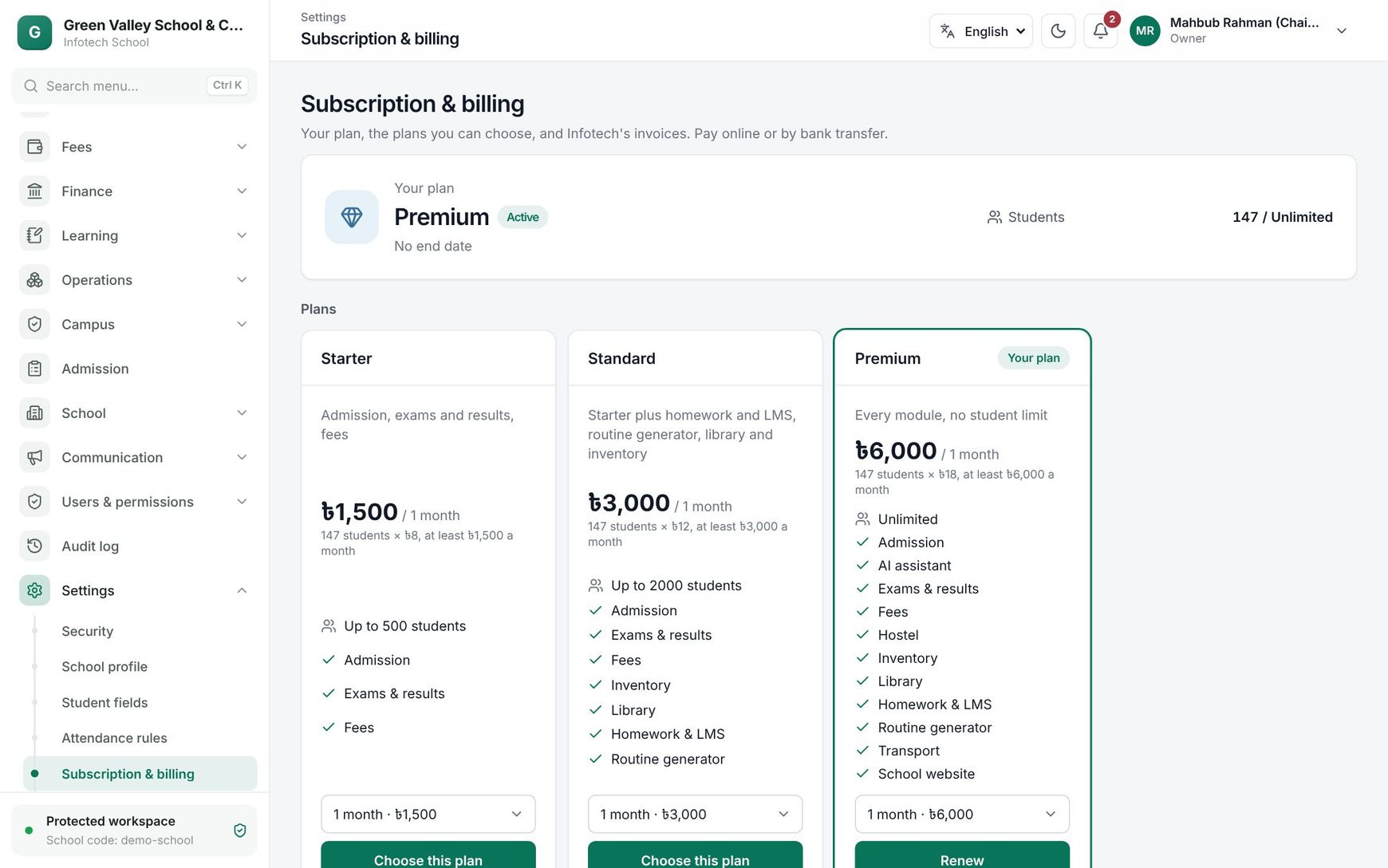 The Subscription & billing page with the current plan, the plans to choose and Infotech's invoices
Your plan
The top card shows the plan name with a badge, the end date and the student count.
| Badge | Meaning |
|---|---|
| Free trial | The school is on its free trial |
| Active | The plan is paid and running |
| Ended — grace period | The end date has passed; everything keeps working until the date shown ("everything works until …") |
| Read-only | The grace period is over; see below |
Students shows your active students against the plan's limit, for example "312 / 400", or Unlimited. The bar turns amber at 80% and red when full. When the limit is reached, new students cannot be added until you move to a bigger plan.
If an invoice is past its due date, a strip says "An invoice is overdue. Please pay soon to avoid interruption."
Choose or renew a plan
Under Plans, each card shows what the plan costs your school, for example "৳8,400 / 1 month", with the working, "350 students × ৳24.00, at least ৳3,000.00 a month", any discount Infotech gave you, the student limit (Up to 500 students or Unlimited) and the modules it includes. Your current plan is marked Your plan.
- If the card offers a choice, pick the period, for example 1 month or 12 months.
- Choose Choose this plan, or Renew on your current plan.
- An invoice is made ("Invoice … is ready to pay") and the payment dialog opens.
How the price is worked out: per month, the larger of (active students × price per student) and the minimum; times the number of months; less your discount; plus tax if Infotech charges it.
- A plan whose limit is smaller than your active students cannot be chosen ("You have more active students than this plan allows").
- Renewing your plan before it ends adds the months after the current end date. Switching to another plan starts the new plan on the day it is paid.
- You can have only one unpaid plan invoice at a time.
Pay an invoice
Invoices from Infotech lists Invoice no., Amount, Due on and Status (Unpaid, Paid or Void). On an unpaid invoice choose Pay:
- Online: choose a payment method such as bKash, Nagad or SSLCommerz and finish on the payment page. Back on the page you see "Payment received — thank you!" and the plan or add-on starts at once.
- Bank transfer: the dialog shows Infotech's bank details under "Or transfer to …". Write the invoice number as the reference; Infotech marks it paid when the money arrives.
If no online method is set up, the dialog says "Online payment is not available yet."
To cancel a plan or add-on invoice you made yourself, use the Cancel invoice button (×) next to Pay. An invoice with a payment still in progress cannot be cancelled.
Renewal, grace period and read-only
- A few days before a paid plan ends (7 days unless Infotech set otherwise), a renewal invoice is made and the owners are notified.
- When the plan ends, a strip above every page says the plan has ended and that everything works until the grace date (7 days unless Infotech set otherwise). Owners get a Renew link in it.
- After the grace period, the school is read-only: everything still opens, but changes are refused with "The plan has ended: the school is read-only until it renews." Paying, signing in, your own security settings and what families do (paying fees, homework) still work. Paying lifts read-only at once.
- During a free trial, a strip counts down the last 7 days ("Your free trial ends in 3 days.") with a Choose this plan link.
The add-on store
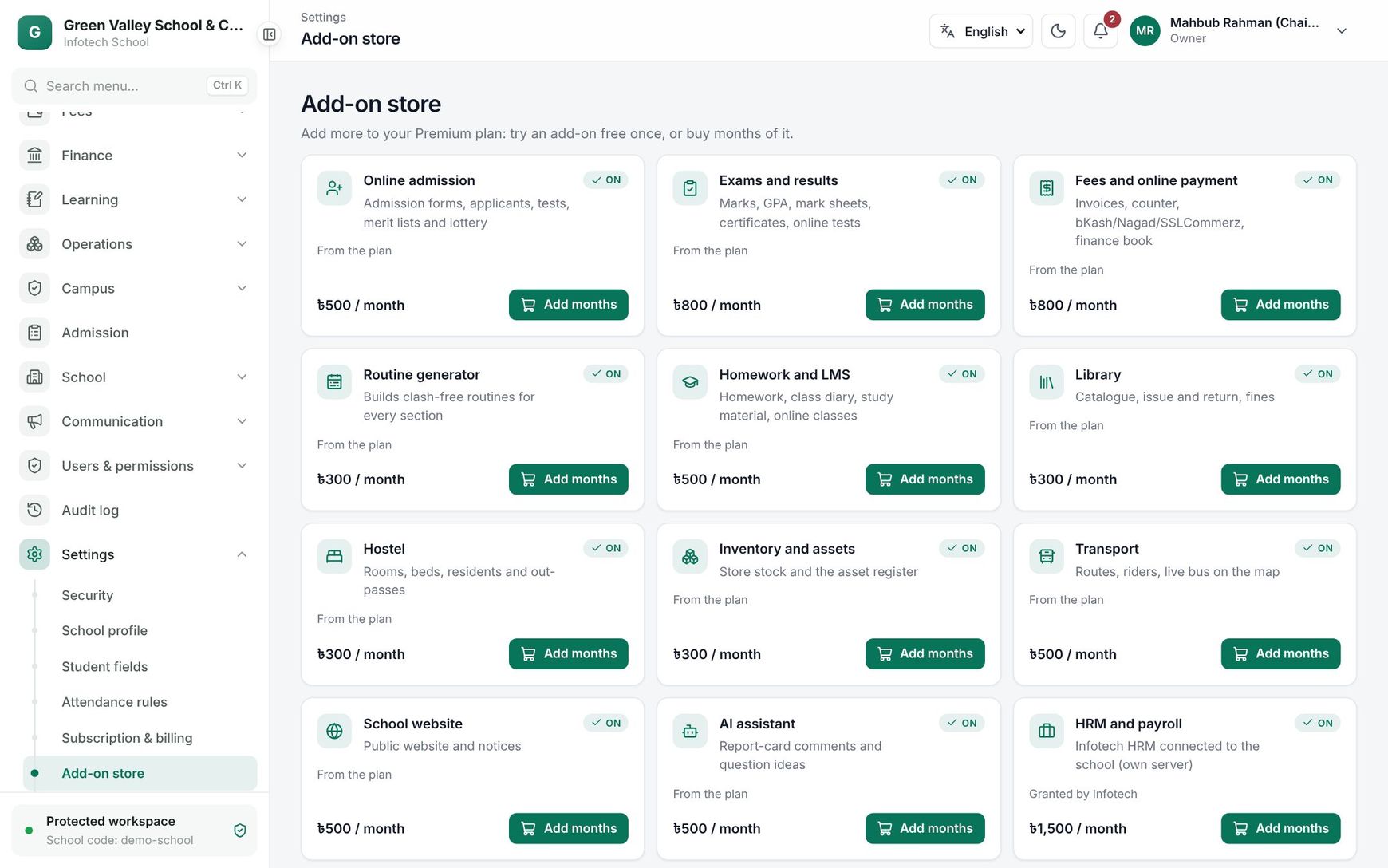 Add-ons with their state, price per month and the trial and buy buttons
Open Settings › Add-on store. Each card shows the add-on, a state badge, where you have it from (From the plan, Granted by Infotech, Infotech trial, Store trial, Bought in the store), until when, and the price per month.
| State | Meaning |
|---|---|
| On | You have it now. Add months buys more |
| Free trial | A free trial is available: Try 14 days free (the number of days is set per add-on) |
| Available | Can be bought with Buy |
| Suspended | Infotech switched it off for your school |
| Not sold | Not offered in the store |
Free trial: one per add-on per school. It switches on at once and ends by itself.
Buy: choose 1, 3, 6 or 12 months (the total is shown) and Make the invoice. Pay it on Subscription & billing. Bought months start after any running trial or paid period. Only one unpaid invoice per add-on at a time.
Note: While the school is read-only, the store is closed: "Renew your plan first: the store is closed while the school is read-only."
Example
Green Valley School has 350 active students on a plan at ৳24 per student with a ৳3,000 minimum: 350 × 24 = ৳8,400 a month. In December the renewal invoice arrives; the principal chooses Pay, then bKash, and the plan runs to the end of January. In March the school tries the Library add-on free, likes it, and buys 12 months, which start the day after the trial ends.
Last updated 30 Oct 2026