Getting started checklist
Getting started is the checklist a new school works through once: classes and subjects, the school profile, the school year, sections, teachers, students and the school's colours. Each step links to the page where you do it and ticks itself off when the work is done, so you always see what is left.
Open Getting started in the sidebar. It needs the setup:write permission, which the Owner, Principal and Office admin roles have.
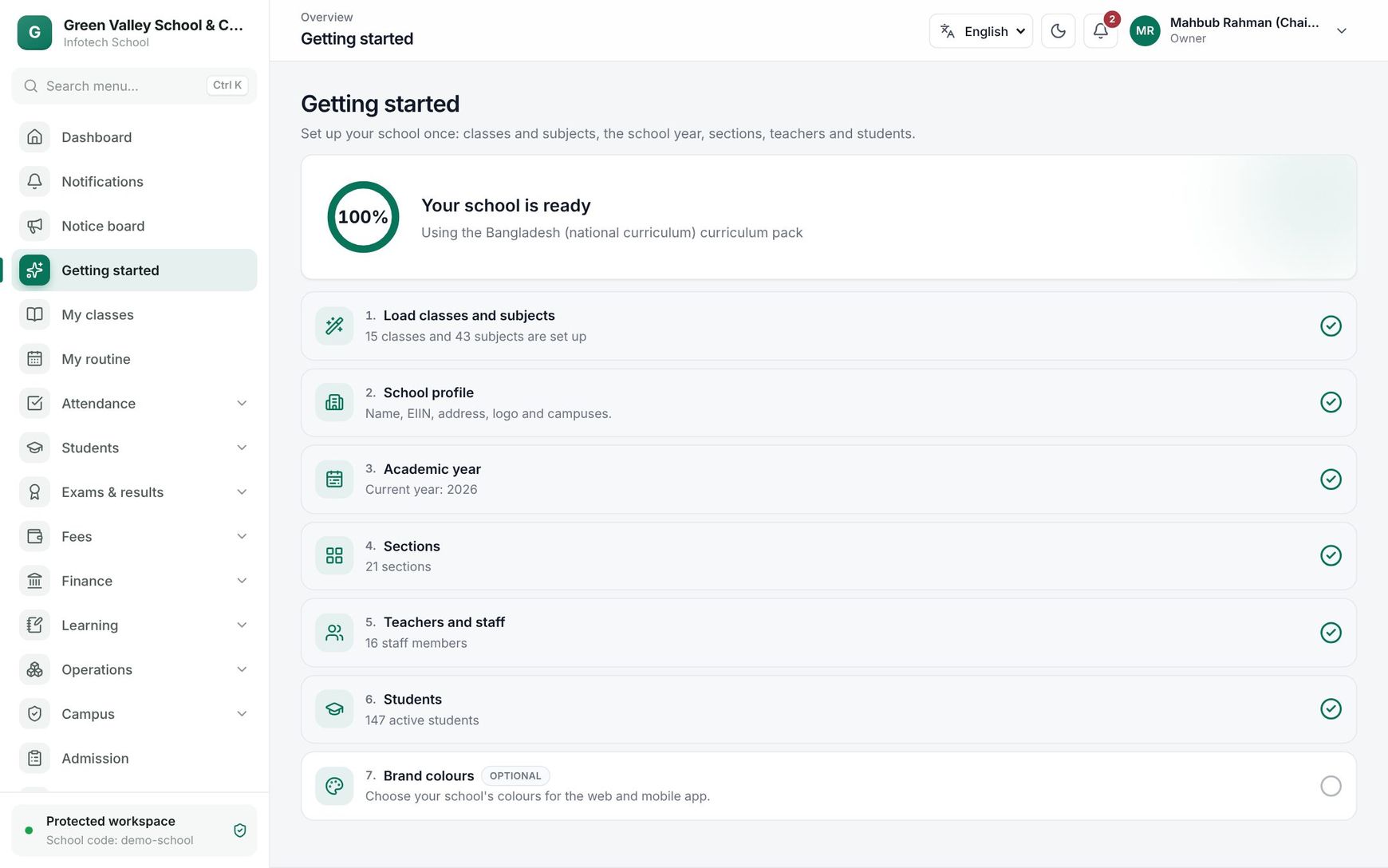 The Getting started page with the progress ring and the seven steps
The progress card
At the top, a ring shows how far you are, for example "4 of 6 steps done". The optional step does not count. When every required step is done the card says Your school is ready. Under it you see which curriculum pack the school uses, for example "Using the Bangladesh (national curriculum) curriculum pack".
Start from a curriculum pack
While the school has no classes yet, the page shows Choose a curriculum pack. A pack fills in, in one go, everything a school in your country usually needs. Pick a pack card and choose Set up from this pack. When it is done you see "Done: 15 classes and … subjects".
| Pack | What it adds |
|---|---|
| Bangladesh (national curriculum) | Classes Play, Nursery, KG and Class One to Class Twelve; the national subjects with board codes and marks split as CQ / MCQ / Practical; the groups Science, Business Studies and Humanities for Class Nine onwards; a Morning shift (7:00–12:00) and a Day shift (12:30–17:00); the Bangla version and English version; Friday and Saturday as the weekend; and this year's government public holidays |
| International (generic) | Kindergarten and Grade 1 to Grade 12; English, Mathematics, Science, Social Studies, Computing, Art and Physical Education marked out of 100; one Day shift; English; Saturday and Sunday as the weekend; no public holidays (you add your own) |
The pack also creates the school profile (with the school name you registered with), a Main campus and the current academic year (for a January start, a year named after the calendar year, such as "2026").
Note: A pack only adds what is missing. Nothing you already have is changed, and you can edit or switch off everything afterwards. The subjects of each class are filled only for a school that has not chosen any yet.
The steps
| # | Step | Done when | Opens |
|---|---|---|---|
| 1 | Load classes and subjects | The school has at least one class | The pack chooser on this page |
| 2 | School profile | The profile has been saved | School profile |
| 3 | Academic year | A year is current | The Years tab of Classes & subjects |
| 4 | Sections | At least one section exists | The Sections tab |
| 5 | Teachers and staff | At least one active staff member | School › Teachers & staff (see Teachers & staff) |
| 6 | Students | At least one active student | Students, or Import while there are none (see Students and ID cards and import) |
| 7 | Brand colours (Optional) | Never ticks: it is a suggestion | Brand colours |
Each row shows a short status, for example "Current year: 2026", "12 sections" or "348 active students". Click a row to go to its page; come back to Getting started to see the tick.
A good order to follow
- Load the pack.
- Fill in the school profile: Bangla name, EIIN, address, logo, the principal's signature and the seal.
- Check the academic year and make it current.
- Add sections to each class and choose a class teacher.
- Add teachers, or import them from Excel, and give them a sign-in.
- Admit students or import a class list.
- Choose your colours.
After that, invite your staff on Users and roles and turn on 2-step sign-in on Security.
Good to know
- The checklist reads the real data, so a step done somewhere else (for example students imported from the Import page) is ticked too.
- Teachers and other roles without
setup:writedo not see Getting started in the sidebar. - Running a pack again later is safe: it only adds classes, subjects, shifts or holidays that are missing.
Example
Green Valley School, Mirpur, signs up in January. The principal, Rahima Begum, opens Getting started, picks Bangladesh (national curriculum) and chooses Set up from this pack. The school now has classes Play to Class Twelve, the Morning and Day shifts, both versions, the year "2026" as current and this year's public holidays. Because the school only runs up to Class Ten, she later switches Class Eleven and Class Twelve off on Classes & subjects. Steps 1 and 3 are ticked; she moves on to the school profile.
Last updated 30 Oct 2026