Infotech School overview
Infotech School is school management software for schools, madrasas and colleges in Bangladesh and abroad. One system holds your classes, students, guardians, attendance, routines, exams, fees, notices and more. Office staff work in the web app; teachers, guardians and students also have a phone app. Every school is kept separate: your data is only ever seen by your own people.
Who it is for
| Person | What they do in Infotech School |
|---|---|
| Owner, chairman or proprietor | Full access, including users, roles, plan and school settings |
| Principal | Runs the school: academics, attendance, exams, fees approvals, notices |
| Office staff, admission officer | Students, guardians, admission, day-to-day records |
| Accountant | Fees, collections and the finance books |
| Teachers | Their own classes: attendance, marks, homework, class diary |
| Librarian, hostel warden, storekeeper, driver, gate security | Their own area only |
| Guardians | Their own children: attendance, routine, results, fees, homework, notices |
| Students | Their own routine, homework, results and notices |
What each person sees depends on their role. The school starts with built-in roles (Owner, Principal, Office admin, Accountant, Teacher and others) and can add its own; see Users and roles.
Three kinds of accounts
Every sign-in belongs to one of three kinds. You choose the kind when you add a person under Users & permissions › Users (the Account type).
| Kind | How they sign in | What they see |
|---|---|---|
| Staff | School code, email and password, plus a code from an authenticator app when two-step verification is on | The menus their roles allow |
| Guardian | School code and mobile number, then a 6-digit code by SMS | My children and everything about their own children |
| Student | School code and mobile number, then a 6-digit code by SMS | My profile, their own routine, homework, results and fees |
Infotech's own team uses a fourth, separate account: the Infotech console, where schools, plans and billing are managed (see Console overview). Console accounts never see school pages, and school accounts never see the console.
Details: Signing in and accounts.
Web and phone
- Web app at school.infotech.center: every feature, for every kind of account. Use it on a computer for office work; it also works on a phone browser.
- Phone app (Android and iPhone) for teachers, guardians and students: attendance, marks, homework, results, fees, notices and notifications. See The mobile app.
Both speak English, Bangla and Arabic. See Languages.
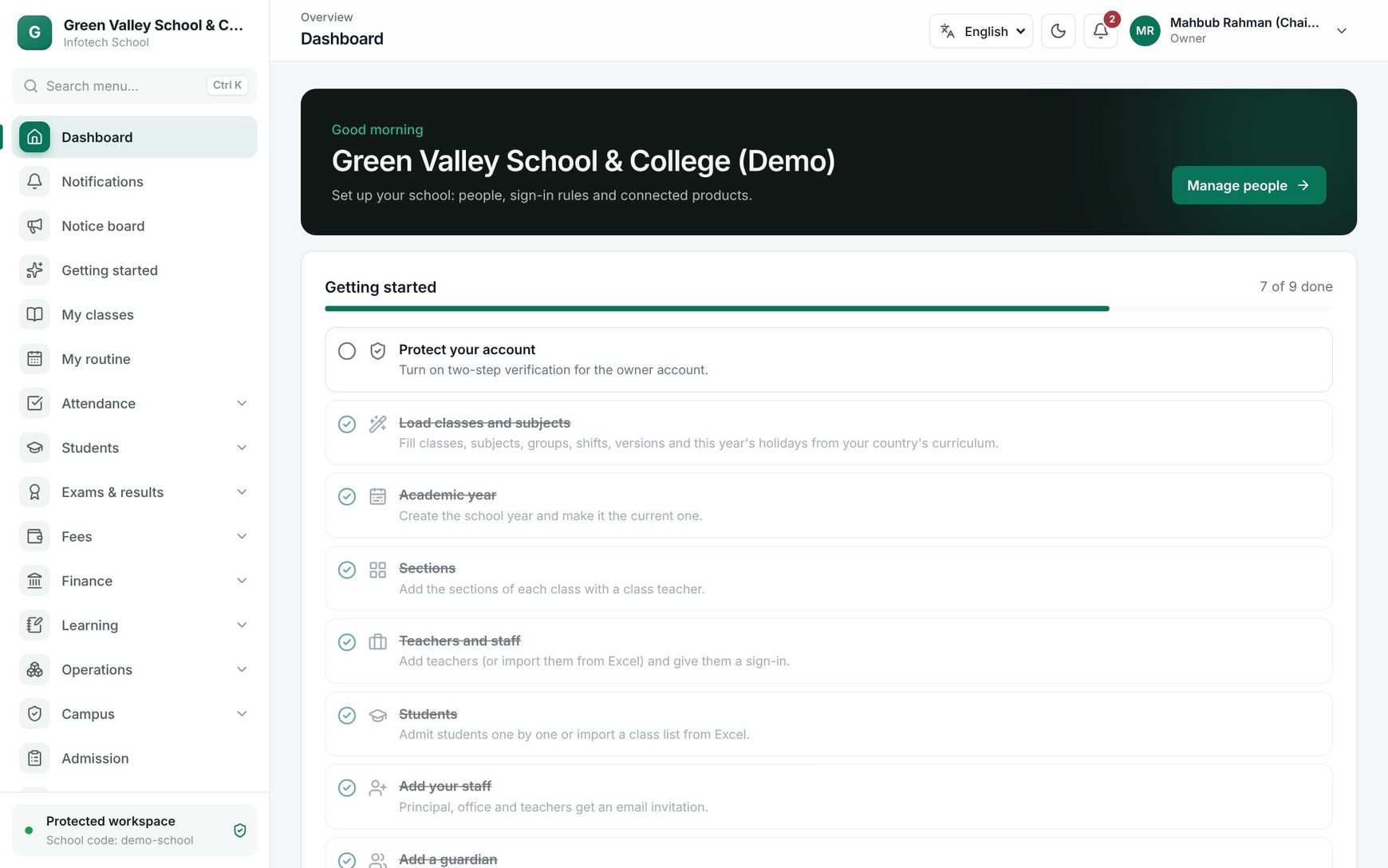 The dashboard of a school owner after signing in
Modules and plans
Some parts are in every plan: users and roles, school setup, students and classes, attendance, notices and the guardian app basics. Other modules come with the school's plan:
| Module | What it adds |
|---|---|
| Online admission | Admission forms, applicants, tests, merit lists and lottery |
| Exams and results | Marks, GPA, mark sheets, certificates, online tests |
| Fees and online payment | Invoices, the fee counter, bKash, Nagad and SSLCommerz, the finance book |
| Routine generator | Builds clash-free class routines |
| Homework and LMS | Homework, class diary, study materials, online classes |
| Library, Hostel, Inventory, Transport | Each runs its own part of the school |
Infotech offers these plans out of the box (Infotech can change them):
| Plan | Modules |
|---|---|
| Free trial | Every module for 30 days, up to 100 students |
| Starter | Admission, exams and results, fees |
| Standard | Starter plus homework and LMS, routine generator, library and inventory |
| Premium | Every module, no student limit |
| Custom | Tailored by Infotech |
A plan is priced per active student per month, with a monthly minimum. A school can also add single modules from the Add-on store, and connect Infotech HRM and Accounting as paid add-ons. Menus for modules outside your plan are hidden. See Subscription and add-on store.
How a school starts
There are two ways.
The school signs up itself. Open school.infotech.center, choose Register your school and fill in School name, School code, Country, Time zone, Your name, Email and Password, then tick the terms. You become the owner, are signed in at once, and get a 30-day free trial with every module.
Infotech creates the school. For a school that signs a contract with Infotech, the Infotech team creates it in the console on the agreed plan. The owner receives an invitation email and chooses a password through it (see Schools).
Note: The School code is the short name everyone types when signing in, for example
greenvalley. Use 3–40 lowercase letters, numbers or hyphens. Choose it carefully and tell your staff and families.
Either way, the owner then opens Getting started and follows the setup wizard: school profile, classes and sections, staff, students and guardians.
Example
Green Valley School, Mirpur. The proprietor, Kamrul Hasan, registers with the school code greenvalley and starts the free trial. He fills in the school profile, adds Class Play to Class Ten with sections, and invites the principal and the office assistant by email. The office imports 640 students with their guardians' mobile numbers. On the first school day, Rahima Begum, mother of Arif in Class Six A, signs in to the phone app with greenvalley, her mobile number and the SMS code, and sees that Arif was marked present at 8:05. Before the trial ends, the school moves to the Standard plan.
Last updated 30 Oct 2026