Self-hosting and deployment
For Infotech's technical team: how Infotech School runs on a server, how changes reach production, the settings that matter, and backups. School staff never need this page. The full step-by-step guide is docs/SCHOOL_DEPLOYMENT_GUIDE.md in the repository; the files it uses are in deploy/.
How it fits together
One Ubuntu server runs everything. nginx on the host serves two domains over HTTPS:
| Domain | Serves |
|---|---|
school.infotech.center | The web app (static files in /opt/school/current-web) |
schoolapi.infotech.center | The API, forwarded to 127.0.0.1:18081 |
The rest runs in the Docker project school (/opt/school/compose.yaml): api (Java 21), postgres (17), redis (7), clamav (virus scanning of every upload) and backup, plus optional minio and prometheus. Only ports 22, 80 and 443 are open; the API, Prometheus and the databases are reachable only from the server itself or Docker's private network. No source code lives on the server.
Server requirements
| Use | CPU | RAM | Disk |
|---|---|---|---|
| Pilot, up to about 20 schools | 2 vCPU | 4 GB | 40 GB SSD |
| School and HRM on one server | 4 vCPU | 8 GB | 80 GB SSD |
| 50 schools or more | 4–8 vCPU | 16 GB | 160 GB SSD |
Use Ubuntu 24.04 LTS (22.04 also works), keep the server on UTC (the app handles each school's time zone), and pick a region near Bangladesh such as Singapore or Mumbai.
First-time setup
- Server basics: enable
ufw(22, 80, 443),fail2banand unattended upgrades; SSH keys only. - DNS: A records
schoolandschoolapipointing to the server. With Cloudflare, keep them DNS-only until the certificates are issued. - Setup script: copy the
deployfolder to the server and runbash /root/school-deploy/scripts/server-setup.sh you@infotech.center. It installs Docker, nginx and certbot, creates thedeployuser with a key used only by GitHub Actions, writes/opt/school/.envwith random passwords, a new token-signing key and the encryption key, installs the nginx sites with Let's Encrypt certificates, and prints four values for GitHub. Safe to run again; it never overwrites secrets. For other domains setSCHOOL_WEB_HOSTandSCHOOL_API_HOSTbefore running it, and changeAPI_HOST/WEB_HOSTin.github/workflows/ci-cd.yml. - GitHub secrets: add
SSH_HOST,SSH_USER(deploy),SSH_PRIVATE_KEYandSSH_KNOWN_HOSTS. Optionally protect theproductionenvironment with required reviewers. - First deploy: Actions › CI/CD › Run workflow on
main. - Check:
/actuator/healthanswersUP,/.well-known/jwks.jsonlists a key,/actuator/prometheusanswers 404 from outside.
The first deploy seeds the Infotech super admin (admin@infotech.center, school code infotech) and the demo-school accounts with the password SCHOOL_SEED_PASSWORD. Change these passwords and turn on two-step verification before real schools join.
Deploying with the CI pipeline
Every push to main runs four jobs; pull requests only test.
| Job | Does |
|---|---|
| Backend | All tests on a real PostgreSQL, API contract check, builds app.jar |
| Web | Type check, lint, tests, formatting, production build |
| Mobile | Analyze, tests, translations check; on main a test Android APK |
| Deploy | Uploads the release to /opt/school/releases/<release>/, runs deploy.sh, smoke test over HTTPS |
scripts/deploy.sh <release> sets SCHOOL_RELEASE in .env, starts the containers and waits up to 5 minutes for the API to be ready (database migrations run at start-up). When healthy it switches current-web to the new web files and keeps the last 5 releases. When not, it prints the API log and goes back to the previous release, so the old version keeps running.
Common commands, in /opt/school:
| Task | Command |
|---|---|
| API logs | docker compose logs -f --tail=200 api |
Apply a changed .env | ./scripts/deploy.sh "$(grep ^SCHOOL_RELEASE= .env | cut -d= -f2)" |
| Roll back | ./scripts/deploy.sh <older release folder> |
Environment settings
All settings and secrets are in /opt/school/.env (mode 600, never in git). The important ones:
| Variable | Meaning |
|---|---|
SCHOOL_API_HOST, SCHOOL_WEB_HOST | The two domains |
SCHOOL_FIELD_ENCRYPTION_KEY | Encrypts 2-step secrets, integration secrets and every uploaded file. Never change it; if lost, that data cannot be read, even from backups |
SCHOOL_JWT_PRIVATE_KEY, SCHOOL_JWT_KEY_ID | Sign the sign-in tokens. Rotate only with the overlap steps in the guide, or everyone is signed out |
SCHOOL_DB_OWNER_PASSWORD, SCHOOL_DB_APP_PASSWORD | Used when the database is first created; changing them later needs a change in PostgreSQL too |
SCHOOL_SELF_SIGNUP_ENABLED | true lets schools register themselves |
SCHOOL_MAIL_* | SMTP for invitations and password resets. Empty: emails are only logged |
SCHOOL_SMS_* | The SMS gateway. log writes codes to the API log only; set up a real gateway before adding guardians |
SCHOOL_PUSH_FCM_CREDENTIALS_BASE64 | Firebase key for push notifications; empty means every alert goes by SMS |
SCHOOL_STORAGE_TYPE | local (Docker volume) or s3 (MinIO, R2 or S3). Decide before schools upload files |
Note: Save the encryption key, the JWT key and the database passwords in the company password manager on the day you set up the server.
Backups
Every night at 21:30 UTC (03:30 in Dhaka) the backup container writes a database dump and a tarball of uploaded files to the school_backups volume and keeps them for SCHOOL_BACKUP_KEEP_DAYS (14). A backup on the same disk does not survive a lost server, so copy it off every night (cron on another machine, or rclone to S3/R2), and keep the encryption key with it.
- Test a restore once a month:
./scripts/restore.sh <dump>restores into a separate test database and prints the number of schools and users. - Real restore:
./scripts/restore.sh <dump> --replacestops the API, replaces the database and starts it again (you must typereplace). - Lost server: set up a new one, put the saved
.envvalues in place before the first deploy, deploy, copy a backup intoschool_backupsand restore with--replace.
Monitoring
Put /actuator/health on an uptime monitor. COMPOSE_PROFILES=monitoring adds Prometheus (SSH tunnel to port 9091). The console's Server status page shows memory, disk, load and the database (see Console overview).
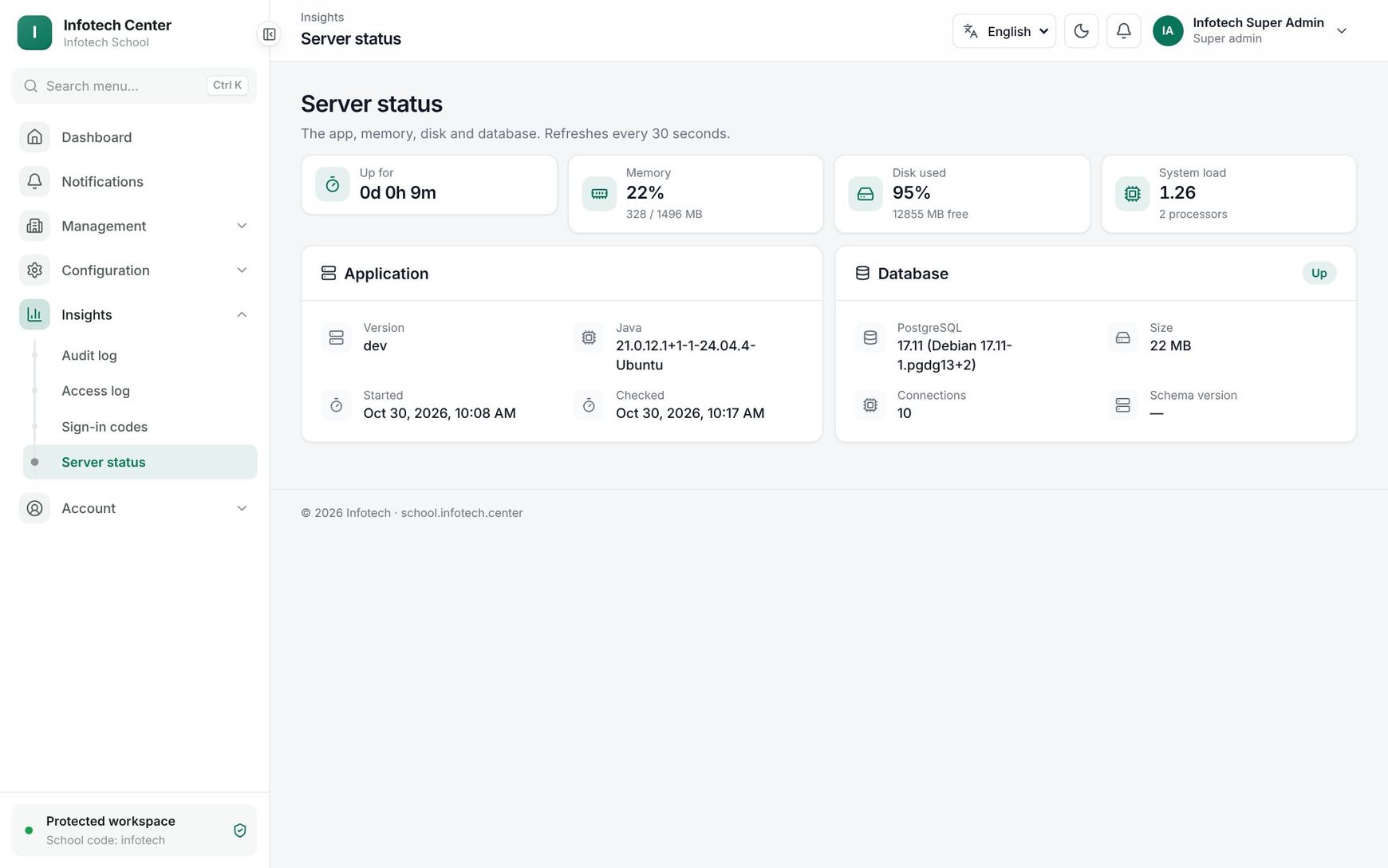 The Server status page in the Infotech console
Example
Moving from the pilot server. After 25 schools join, the team buys a 4 vCPU / 16 GB server, runs the setup script there with the same .env values, deploys, stops the old API, restores a fresh dump with --replace, copies the files volume, switches DNS and updates SSH_HOST and SSH_KNOWN_HOSTS in GitHub.
Last updated 30 Oct 2026