Admission
Admission runs your admission rounds from start to finish: a public form parents fill in online, paper applications from the office, the application fee, the admission test with rooms and admit cards, a merit list or an open lottery, and finally admitting the selected children into a class. Guardians get an SMS at each important step.
Admission needs the Admission module in the school's plan (see Subscription and add-on store). To see it you need admission:read; to change anything, admission:write. The Owner, Principal, Office admin and Admission officer roles have both. Admitting a child as a student also needs student:write.
The admission page
Open Admission. Tiles show Open forms, Applicants, Selected and Admitted. Each form card shows how many applicants there are for how many seats, and how many are selected and admitted. Copy result-check link copies the page where parents check results (see below).
Create an admission form
- Choose New admission form.
- Under About the form: Title (English), Title (Bangla), Academic year the children join, and Link name, part of the public link (lowercase letters, digits and dashes). The link name cannot change later.
- Under Dates and selection: Opens on, Closes on, Test / lottery date, How seats are filled and the application fee (collected at the school).
- Under Classes and seats, add each class taking new children and its Seats.
- Under For parents, write Instructions and Documents to bring or upload.
- Choose Create form. The form starts as Draft.
| How seats are filled | What happens |
|---|---|
| Admission test (merit list) | You enter test marks; the highest marks get the seats, the rest are waitlisted in order. |
| Lottery | A random seed orders the applicants; anyone can check the draw. |
| First come, first served | Seats go in the order of application. |
At the top of the form, switch between Draft, Open and Closed. The public link works only while the form is Open, and a form needs at least one class with seats to open. Under Public link for parents you find Copy link, Download QR code (PNG) for posters, and Open form.
Settings
The Settings tab holds the form fields above and the Admission test settings: Test time, Venue, Days to complete admission (after this the seat can go to the next waiting child) and Admit card only after the fee is paid. Here you also add Test rooms (each with its Seats), Quotas (a share of each class's seats kept for a group, such as freedom fighters' children) and Extra questions asked on the public form (Text, Number, Date, Choice list or Yes / no).
Applications
Parents open the link, choose the class and fill in the Child and Guardian steps (and More when you have quotas or extra questions), then Review and Submit application. For Bangladeshi schools the birth registration number (17 digits) is required, and the same child cannot apply twice in one form. The parent gets an application number such as ADM-2026-00012 on screen and by SMS, and can upload up to 6 files (PDF or image, up to 5 MB each).
For a form handed in at the office, open the Applicants tab and choose Paper application.
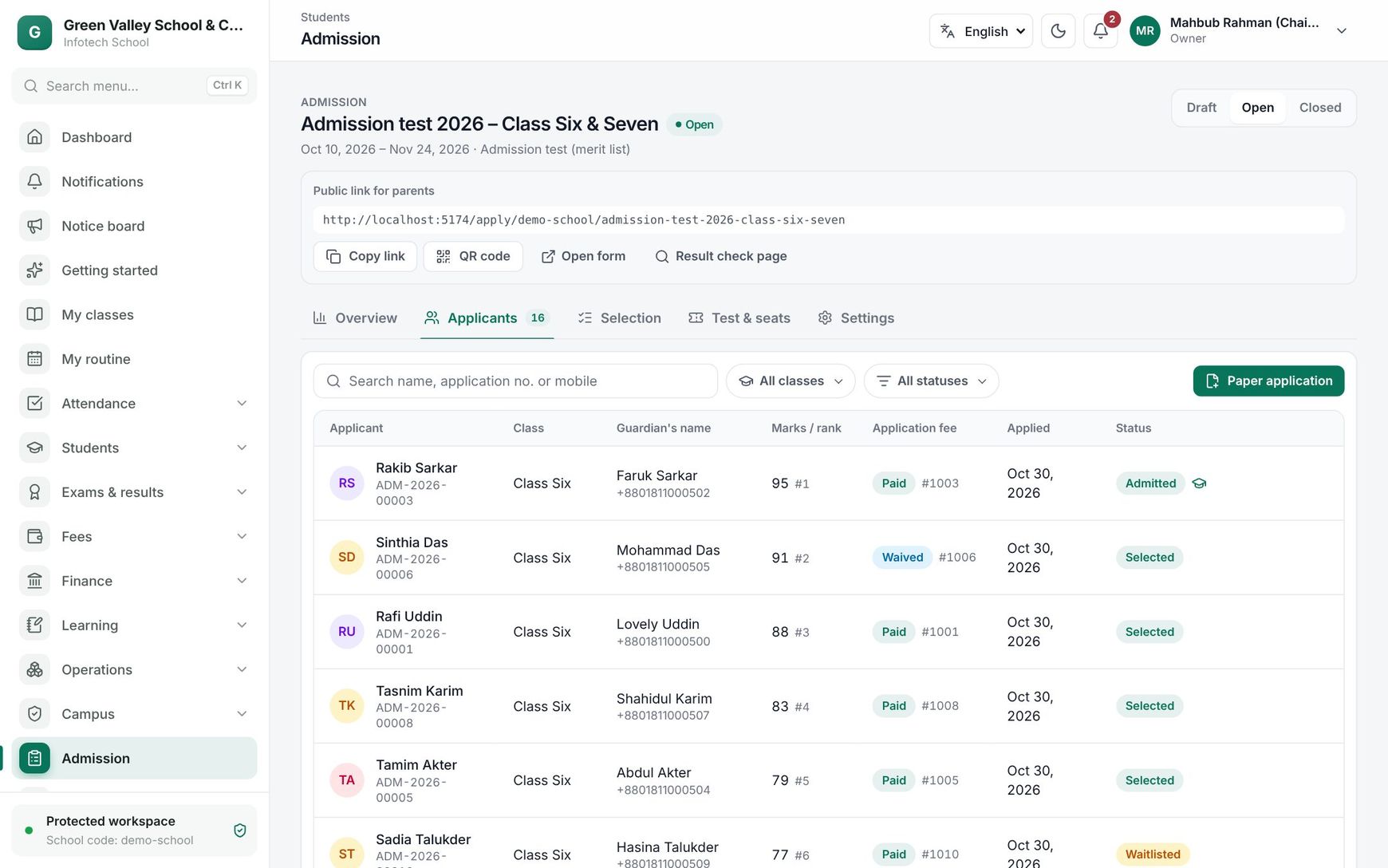 The applicants of an admission form
Click an applicant to see the details. There you can:
- record the fee: Mark paid with a Receipt no., Waive, or Mark unpaid;
- choose a Decision and Save decision;
- upload or download documents;
- Admit a selected applicant.
| Status | Meaning |
|---|---|
| Submitted | Received, waiting for selection |
| Shortlisted | Called for the next step |
| Selected | Offered a seat |
| Waitlisted | On the waiting list, in order |
| Not selected | Not offered a seat |
| Withdrawn | Withdrawn by the family or the school |
| Admitted | Now a student |
| Offer expired | Admission was not completed in time |
Selected, waitlisted and not-selected applicants get an SMS.
Test, merit list and lottery
On Test & seats, choose Make seat plan: every applicant still in the running gets a roll number, a room and a seat, class by class in order of application. You can run it again after late applications; those already seated keep their seats. With the fee rule on, unpaid applicants wait. Then print with Print 118 admit cards (the button shows the number) and Attendance sheets. You can narrow both to one class or one room.
On Selection, work class by class:
- Merit: type the marks, choose Save marks (40) (the number of marks changed), then Make merit list. Highest marks first; on equal marks the earlier application wins. You can run it again after correcting marks.
- Lottery: choose Draw lottery. It happens once and cannot be repeated. Overview shows the Seed, the full order and a Result hash, with Copy proof, so anyone can check the draw.
- First come: choose Select in order.
With quotas, each quota's share of the seats goes first to its best-ranked applicants; seats a quota cannot fill go to everyone else.
When offers expire or families withdraw, open Overview and choose Fill seats under Fill free seats. Expired offers close and the next waiting applicants are selected and told by SMS.
Parents check the result
The result-check page asks for the application number and the guardian's mobile. It shows the status, rank, test details, the date to complete admission, and Download admit card (after the fee is paid, when you require it).
Admit to a class
Open a Selected applicant and choose Admit. Pick the Section of the class and year applied for, and confirm. The child becomes a student with the next roll number, the guardian is linked as main contact, the photo is carried over, and the guardian gets an SMS with the student number. Open student record takes you to the new student. The plan's student limit applies.
Examples
Class Six admission test. The form "Admission test 2026 – Class Six & Seven" has 40 seats in Class Six, a fee of 500 Taka and rooms 201 and 202. 118 children apply. The office marks fees paid, makes the seat plan, prints admit cards, enters marks after the test and makes the merit list: 40 selected, 78 waitlisted.
Play group lottery. 60 families apply for 25 Play seats. On lottery day the principal chooses Draw lottery in front of the parents and shares the proof on the notice board.
Last updated 30 Oct 2026