Fee defaulters and reports
Two pages tell you how fee collection is going. Fee defaulters lists the students whose fees are overdue and lets you remind their families in the app or by SMS. Fee reports shows what came in, how and by whom, and checks online payments against the settlement file your payment provider sends.
Both are under Fees and need the fee:read permission (Owner, Principal, Office admin, Accountant) and the Fees module in the school's plan. Sending reminders needs fee:collect.
Fee defaulters
Open Fees › Fee defaulters. A student is listed when at least one of their invoices is still open after its due date. The amount includes today's late fines. The list covers the active academic year and is sorted by the largest amount first.
The strip at the top shows the number of Students and the total Overdue. Narrow the list with Class (All classes) and Minimum due, for example to see only families who owe more than Tk 3,000.
| Column | Shows |
|---|---|
| Student | Name and student number |
| Class | Section and roll |
| Invoices | How many overdue invoices |
| Oldest due | The due date of the oldest one |
| Phone | The primary guardian's mobile number |
| Overdue | The amount overdue, fines included |
Export CSV downloads the list (student no., name, class, roll, overdue, phone) for Excel; Bangla names open correctly.
Remind the families
- Tick students, or choose Select all (Clear selection to undo).
- Choose:
- Remind in app: every guardian of each student gets an in-app notification (and a push on their phone) saying the fees are overdue, with a link to pay. It is free.
- Remind by SMS: the same in-app reminder, plus an SMS to the primary guardian. Confirm with Send. Each SMS uses the school's SMS credits (see SMS).
- A message confirms, for example "Reminded 42 families · 38 SMS". Students without a guardian phone get no SMS.
The SMS reads like: "Green Valley School: Nusrat Jahan's fees of BDT 3020.00 are overdue. Please pay at the office or in the app."
Tip: Families are also reminded automatically in the app a few days before each invoice is due. Set the number of days in Fee setup › Rules › Remind before due (days).
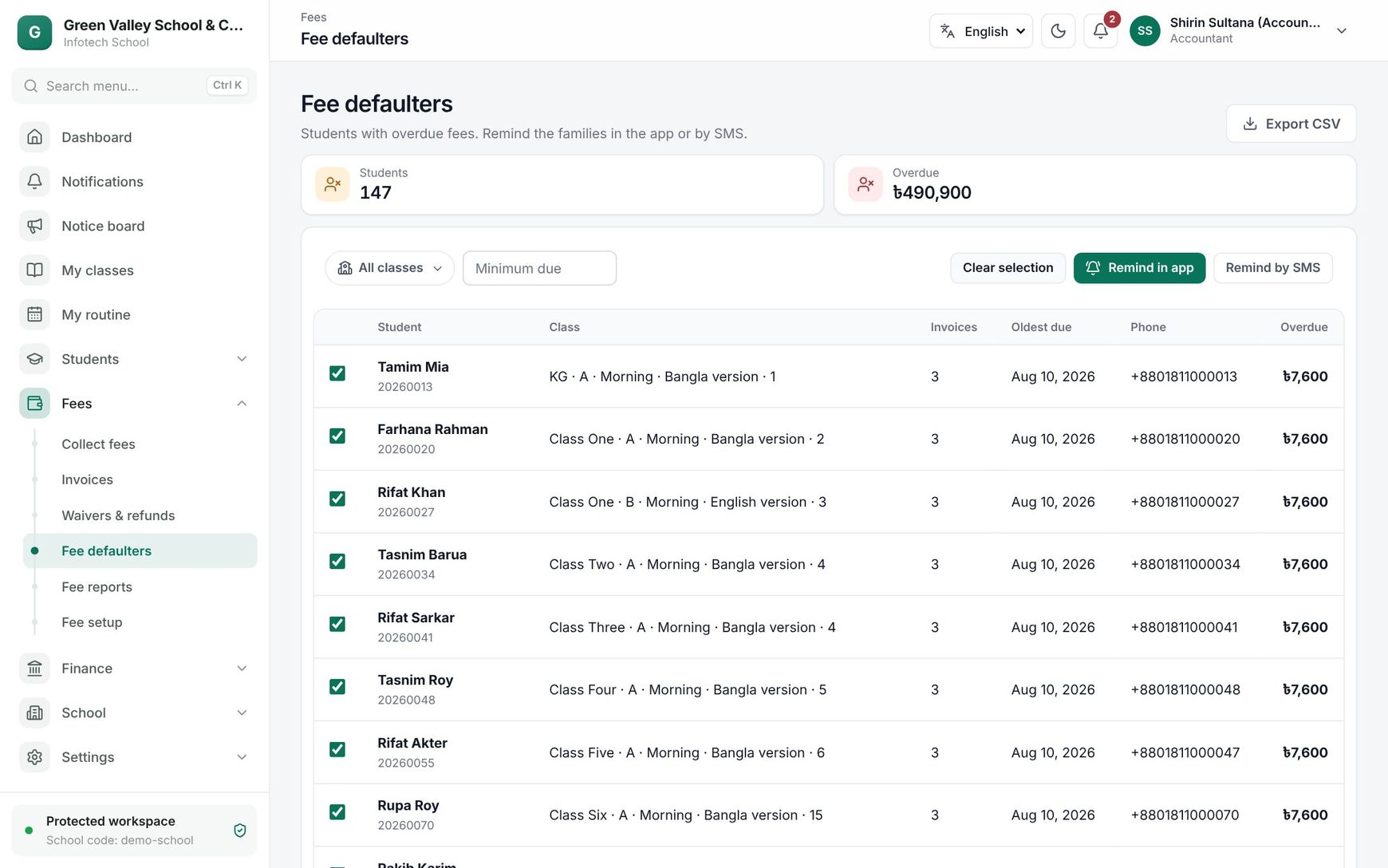 The Fee defaulters list with students selected for a reminder
Fee reports
Open Fees › Fee reports. It has two tabs.
Collection
Choose From and To (up to a year). You see:
| Part | Shows |
|---|---|
| Collected, Receipts | The total received and the number of payments |
| By method | Cash, bank, bKash, Nagad and the rest |
| By fee head | Each fee head by its code (TUITION, SESSION…) and Fine |
| By class | Which classes paid how much |
| By collector | Each cashier's total; online payments are grouped as "Online" |
| By day | A chart of the daily total |
Use it for the monthly report to the managing committee, or to compare cashiers.
Reconciliation
bKash, Nagad and SSLCommerz send the school a settlement report of what they paid into its account. Reconciliation compares that file with the online payments recorded in the app.
- Choose From, To and the Gateway (or All gateways).
- Add the Settlement file: a CSV or Excel (.xlsx) file from the provider with a transaction ID column and an amount column (columns whose names contain "trx", "txn", "transaction id" or "amount" are found by themselves).
- Choose Compare.
The strip shows how many lines are Matched and how many are Problems.
| Column | Shows |
|---|---|
| Transaction ID | The provider's transaction |
| Settled | The amount in the settlement file |
| Recorded | The amount recorded in the app |
| Receipt no. | The school receipt(s) of that payment |
| Status | See below |
| Status | Meaning |
|---|---|
| Matched | In both, same amount |
| Amount differs | In both, but the amounts are different |
| Not in school records | The provider paid it, but the app has no such online payment |
| Not settled | The app recorded it, but it is not in the settlement file |
Look into every problem line: a Not settled payment may still arrive in the next settlement; a Not in school records one may be a payment made outside the app.
Good to know
- Waived amounts are not overdue: only what is still owed counts.
- Cancelled invoices never appear on either page.
- Reminders sent are written to the Audit log with the number of families and SMS.
Examples
End-of-month follow-up. On 25 November the accountant filters Class to Class Nine and Minimum due to Tk 1,000: 17 students. She chooses Select all and Remind by SMS; each English SMS fits in one part, so 17 credits are used, and the families get the reminder in the app too.
Checking bKash. The bKash merchant panel's settlement for 1–30 November has 212 transactions. The accountant uploads it with Gateway bKash: 211 are Matched and one shows Not in school records. It was a guardian who sent money to the merchant number directly; the accountant records it at the counter with method bKash and the transaction ID.
Last updated 30 Oct 2026