Guardians
A guardian is a parent or other adult responsible for a child. Guardians get the school's SMS, sign in to the app to follow their children, and may be allowed to collect them at the gate. One guardian record is shared by all their children, found by mobile number, so a mother of three is one guardian with three children.
Where guardians come from
You do not add guardians on their own. They are created with their children:
- on the New student form (see Students),
- from an Excel import (see ID cards and Excel import),
- when you admit an applicant from Admission.
Each time, the mobile number is checked first: a number already in the school links the same guardian. 01711000001, +8801711000001 and 1711000001 count as the same number.
The guardian list
Open Students › Guardians (permission student:read). The header shows how many guardians the school has. Search by name or mobile number.
| Column | Shows |
|---|---|
| Guardian | Name |
| Mobile number | Where SMS and sign-in codes go |
| Children | How many children are linked |
| Sign-in | Can sign in to the app when the guardian has an account |
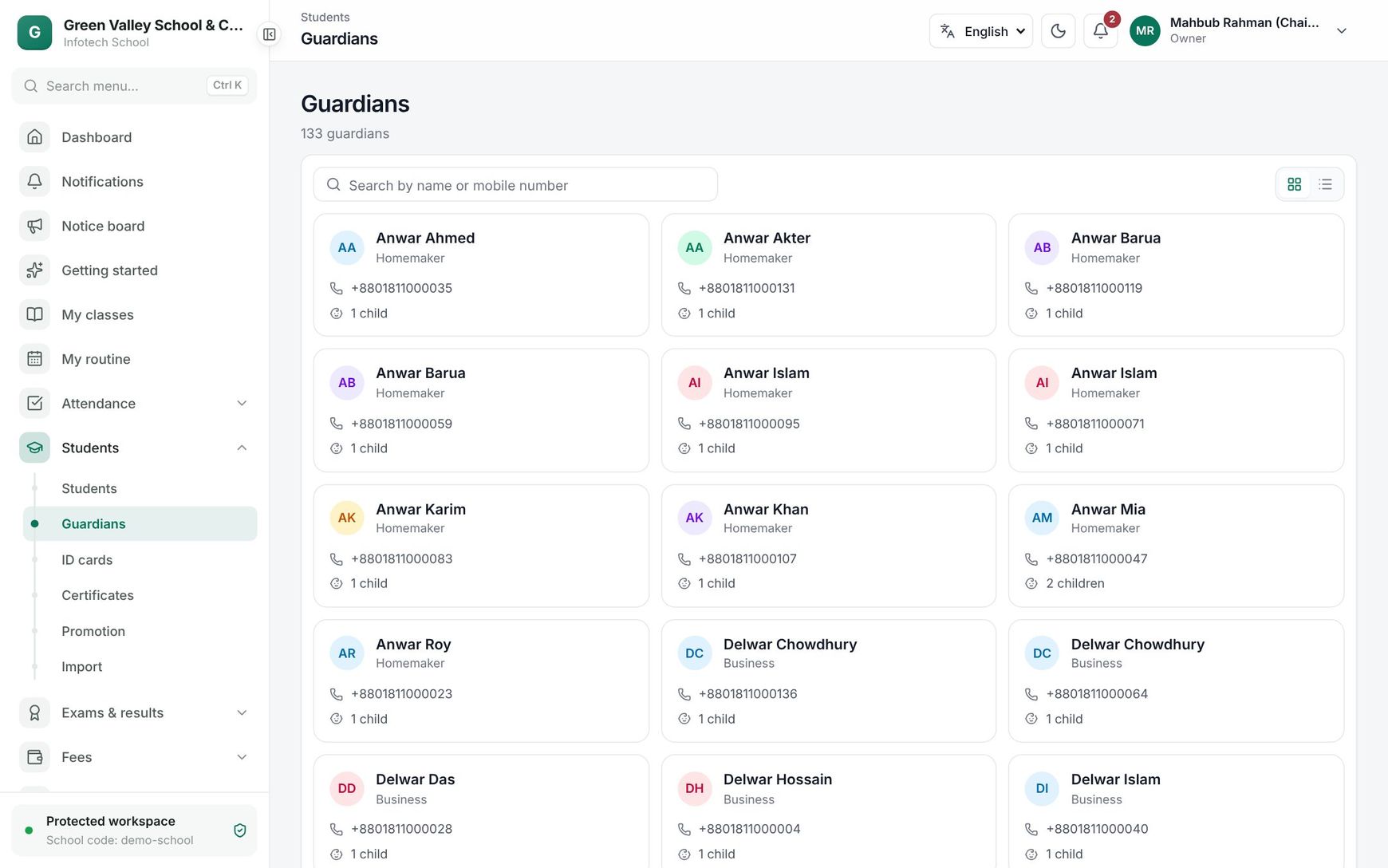 The guardian list
A guardian's page
Click a guardian to open their page. Under Guardian you can change Name (English), Name (Bangla), Mobile number, Email (optional), Occupation, Monthly income range and Address, then choose Save changes. Children lists every linked child.
Note: Changing the mobile number changes where SMS and sign-in codes go. A number that another guardian already has is refused.
National ID (NID) is sensitive: only people with student:sensitive (by default Owner and Principal) see it. Enter 10, 13 or 17 digits and choose Save NID.
Give a guardian a sign-in
Choose Create sign-in and confirm. The guardian then signs in to the app with an SMS code sent to their mobile and sees their children. You need the student:write and user:write permissions. If an account with that number already exists, it is linked instead of a new one being made.
Link guardians to a child
On the student's record, open the Guardians tab. Each guardian card shows the relation, Main contact, May pick up or May not pick up, and Can sign in to the app.
- Add guardian: type the mobile number first. A guardian already in the school is found and linked; otherwise choose Enter someone new and fill in the name. Set Relation, Main contact and May pick up, then choose Add guardian.
- Edit: change the Relation (Father, Mother, Local guardian, Other), Main contact ("Gets the school's SMS and notices") and May pick up ("Allowed to take the child home").
- Open: go to the guardian's page.
- The remove button asks "Remove this guardian?" and unlinks the guardian from this child only.
Good to know:
- A student always keeps at least one guardian, and exactly one main contact.
- To change the main contact, switch Main contact on for the new person. You cannot just switch it off.
- When you remove the main contact, another guardian of the child becomes the main contact.
- The same guardian cannot be linked twice to one child.
- Guardians with May pick up are always on the child's pickup list at the gate (see Child pickup).
What the guardian sees
After signing in with the SMS code, the guardian sees their own children only. My children shows a card for each child with the class and class teacher. Opening a child shows four tabs:
| Tab | Shows |
|---|---|
| Profile | Class, section, roll, class teacher, date of birth, gender, blood group |
| Attendance | The percentage this year, with a warning when it is below the school's minimum |
| Routine | The child's weekly class routine |
| Leave | Leave applications |
To ask for leave, the guardian chooses Apply for leave, sets From, To and Reason, and chooses Send application. The class teacher decides. A leave can be up to 60 days and can start at most a week ago. Applications show as Waiting, Approved, Not approved or Withdrawn; a waiting one can be withdrawn.
Depending on the school's plan, the guardian's menu also has Fees, Results, Homework, Class diary, Study materials, Pickup, Conduct, Hostel, School bus, Online tests and Library books. The same is in the mobile app.
If a guardian sees "No children linked yet", their sign-in is not linked to a guardian record. Check that the mobile number on the guardian's page is the one they sign in with.
Examples
Siblings share one guardian. Rahima Begum has Arif in Class Six A and Nusrat in Class Two A. Both records link to the same guardian, so she gets one sign-in, sees both children under My children, and the school's SMS reach her once per notice.
The father takes over as main contact. Abdul Karim's wife goes abroad for work. The office opens their son's Guardians tab, chooses Edit on Abdul Karim and switches Main contact on. SMS now go to him; his wife stays linked and may still pick up.
Last updated 30 Oct 2026